How Do I Get Instagram Insights
How Do I Get Instagram Insights: Your Complete Guide to Unlocking Performance Data
So, you've been posting great content on Instagram, but you're starting to wonder: is it actually working? Are people seeing it? This is where Instagram Insights comes into play. Insights are essentially your free, built-in analytics tool that helps you understand exactly who your audience is and how they interact with your posts, Stories, and Reels.
If you've been asking yourself, "How Do I Get Instagram Insights?" you've landed on the right page. This powerful data is crucial for anyone serious about growing their brand, whether you're an influencer, a small business owner, or just trying to build a larger personal following. Let's dive into the simple steps required to unlock this treasure trove of information.
First Things First: Do You Have a Professional Account?
Before you can access any performance data, you need to ensure your Instagram profile is set up correctly. Instagram Insights is only available to users who have converted their standard personal profile into a Professional Account. This means switching to either a Creator Account or a Business Account.
Don't worry, converting your account is completely free and only takes a minute or two. If you're currently using a personal account, you won't see the "Insights" button anywhere on your profile until this switch is made. This is the absolute prerequisite for answering the question, "How Do I Get Instagram Insights?"
Switching to a Professional Account
If you haven't switched yet, here is the quick step-by-step process. Ensure your Instagram app is updated to the latest version before you begin.
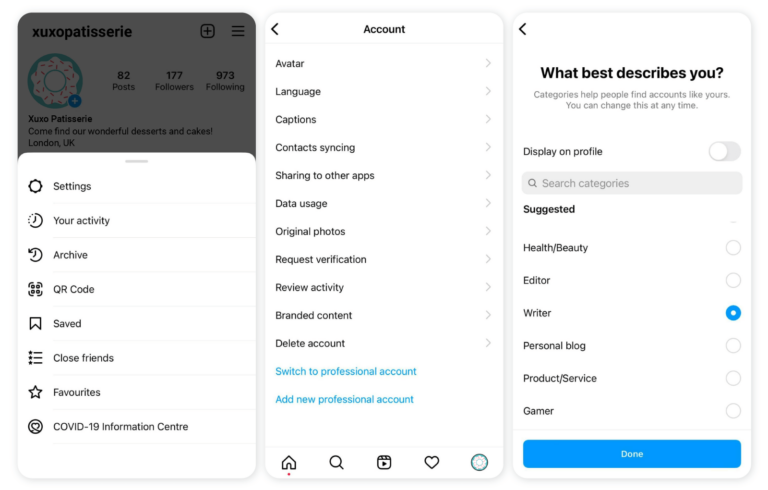
- Open the Instagram app and navigate to your profile page.
- Tap the three horizontal lines (the hamburger menu) in the top right corner.
- Go to Settings and Privacy.
- Scroll down and tap Account type and tools.
- Select Switch to Professional Account.
- Choose the category that best describes you (e.g., Blogger, Product/Service, Artist).
- Select whether you want a Creator Account (usually better for public figures and content creators) or a Business Account (ideal for physical businesses and e-commerce).
- Follow the remaining prompts, which usually involve connecting to a Facebook Page (optional for Creators, recommended for Businesses).
Once you complete these steps, Instagram will immediately transform your account, and the Insights feature will be activated. Note that Insights will only track data from the moment you switch; it won't pull historical data from when you were a personal profile.
Understanding the Account Types
While both Creator and Business Accounts give you full access to Insights, there are subtle differences in tools they offer. Business Accounts typically get more e-commerce features, like quick reply templates and location pins, while Creator Accounts offer more flexible monetization options and granular control over inbox filtering.
The good news is that both types allow you to fully answer the question, "How Do I Get Instagram Insights?" and view all necessary performance metrics. If you realize later that the other account type suits you better, you can switch between Creator and Business seamlessly.
Navigating the Instagram Insights Dashboard

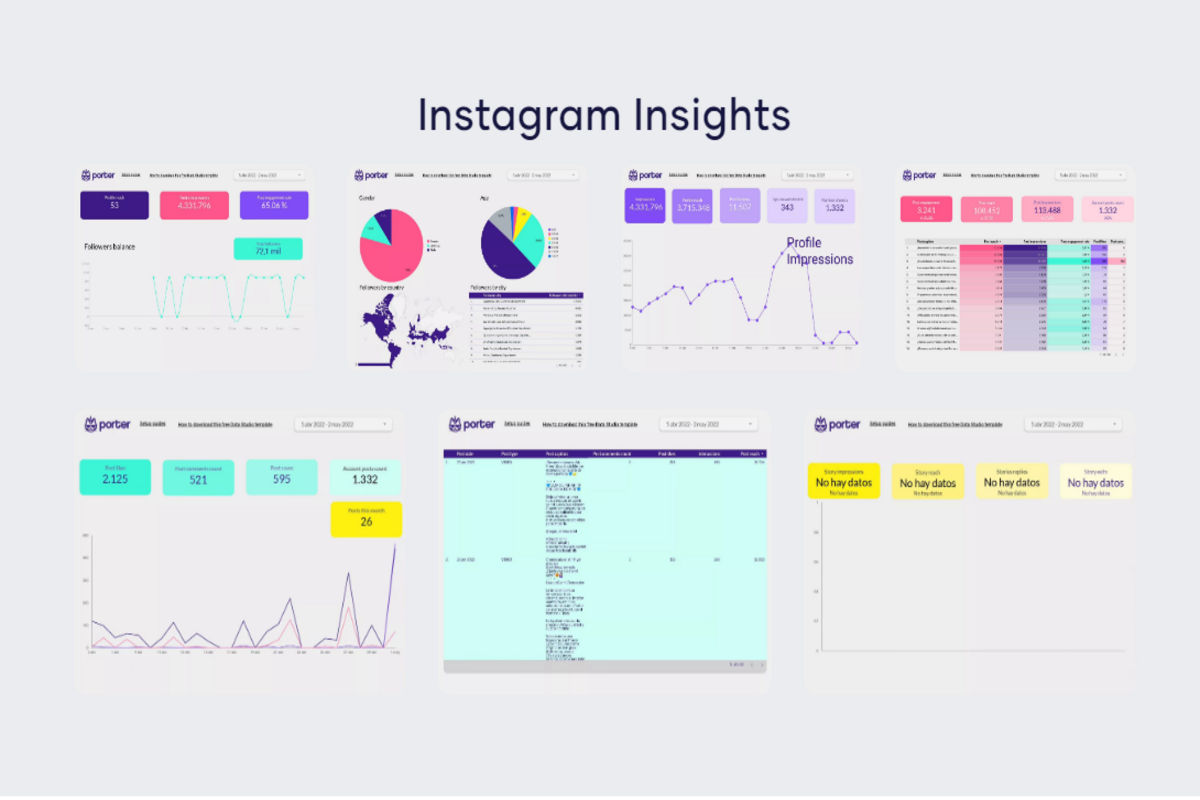
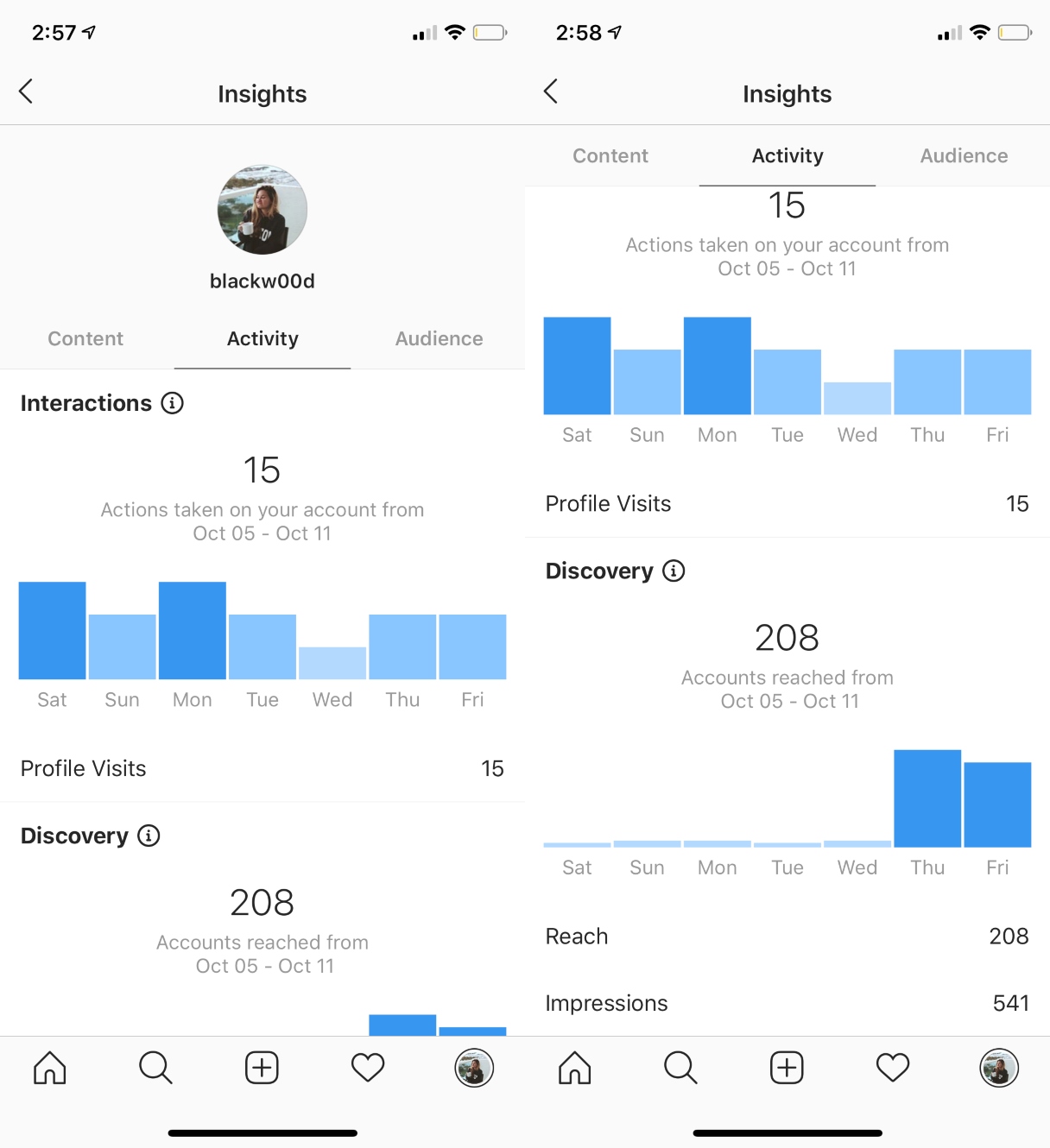
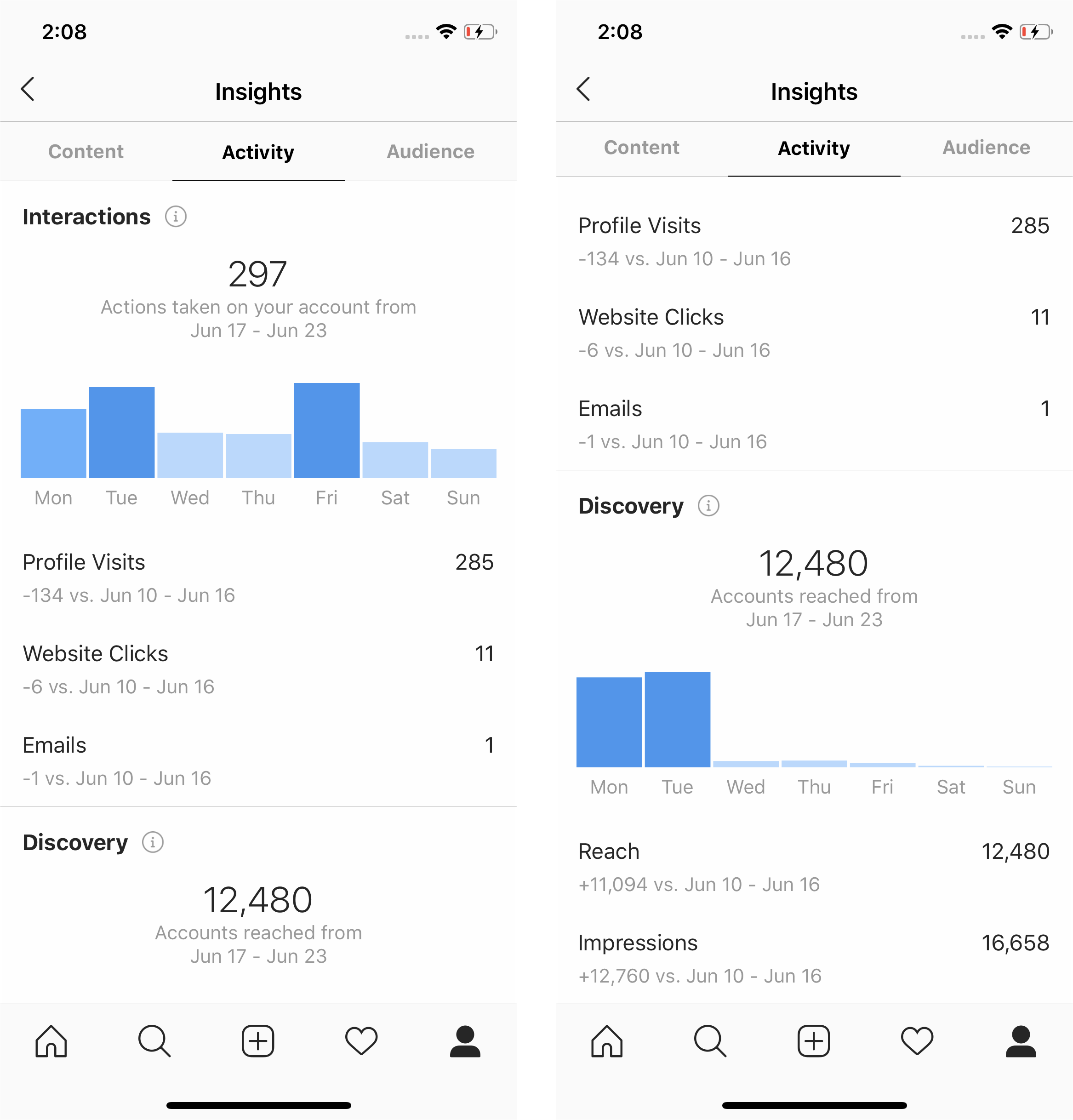
Now that your account is set up, accessing your data is straightforward. The dashboard is designed to be user-friendly, breaking down performance across various categories like Content, Activity, and Audience.
You can access your Insights from two primary locations: the main profile page for an overview, and on individual posts for specific performance details.
Accessing Insights on Your Profile
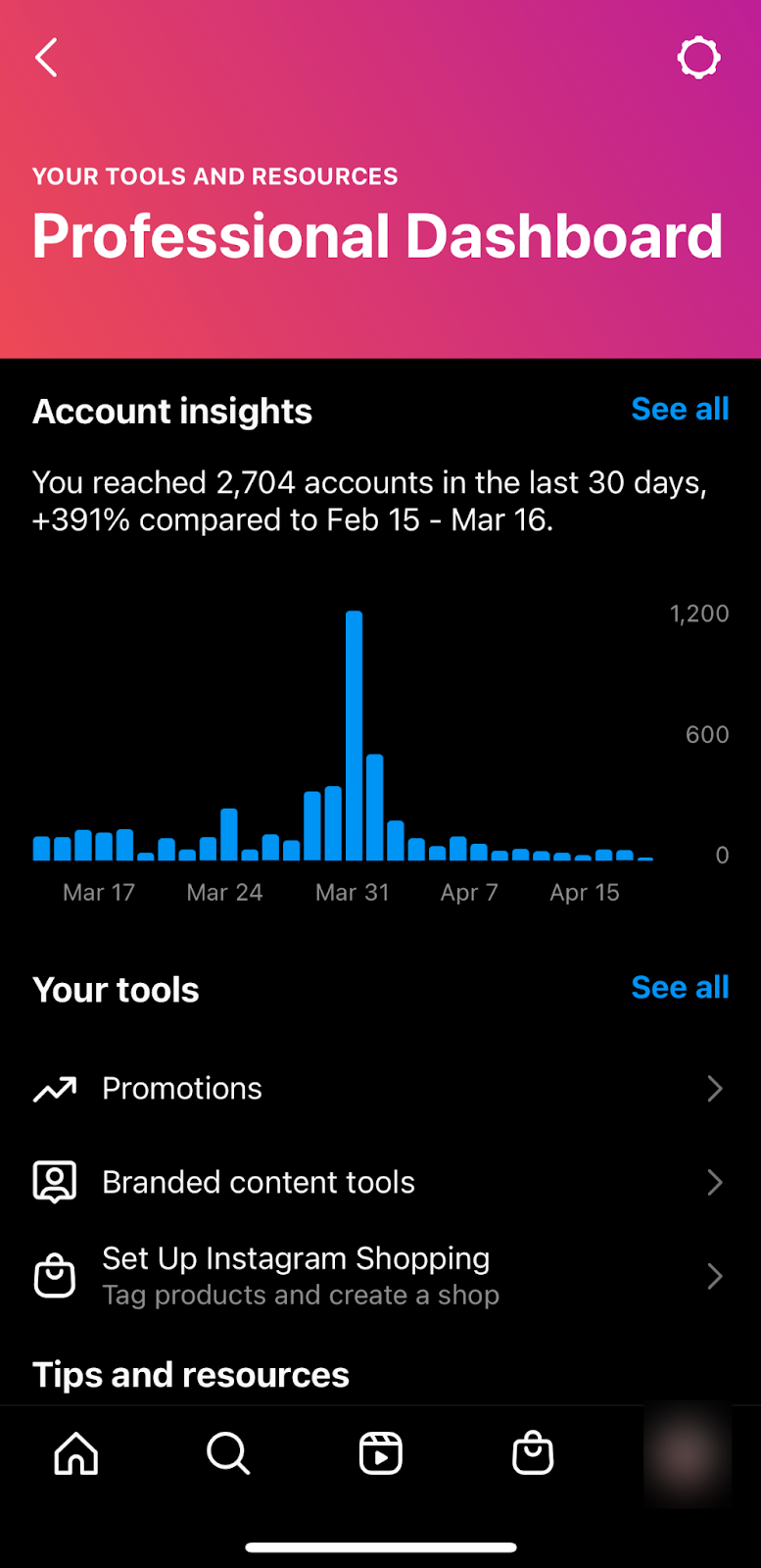
This is where you'll find the comprehensive view of your account's performance over the last 7, 14, 30, or 90 days. It gives you the big picture context necessary for strategic planning.
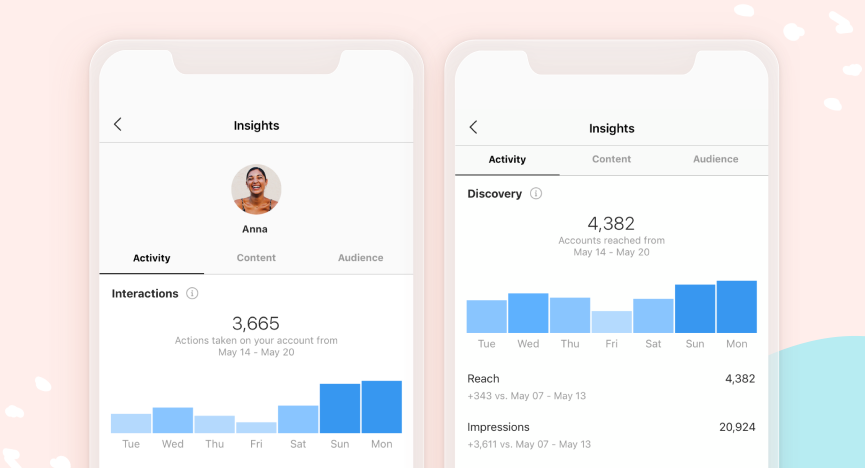
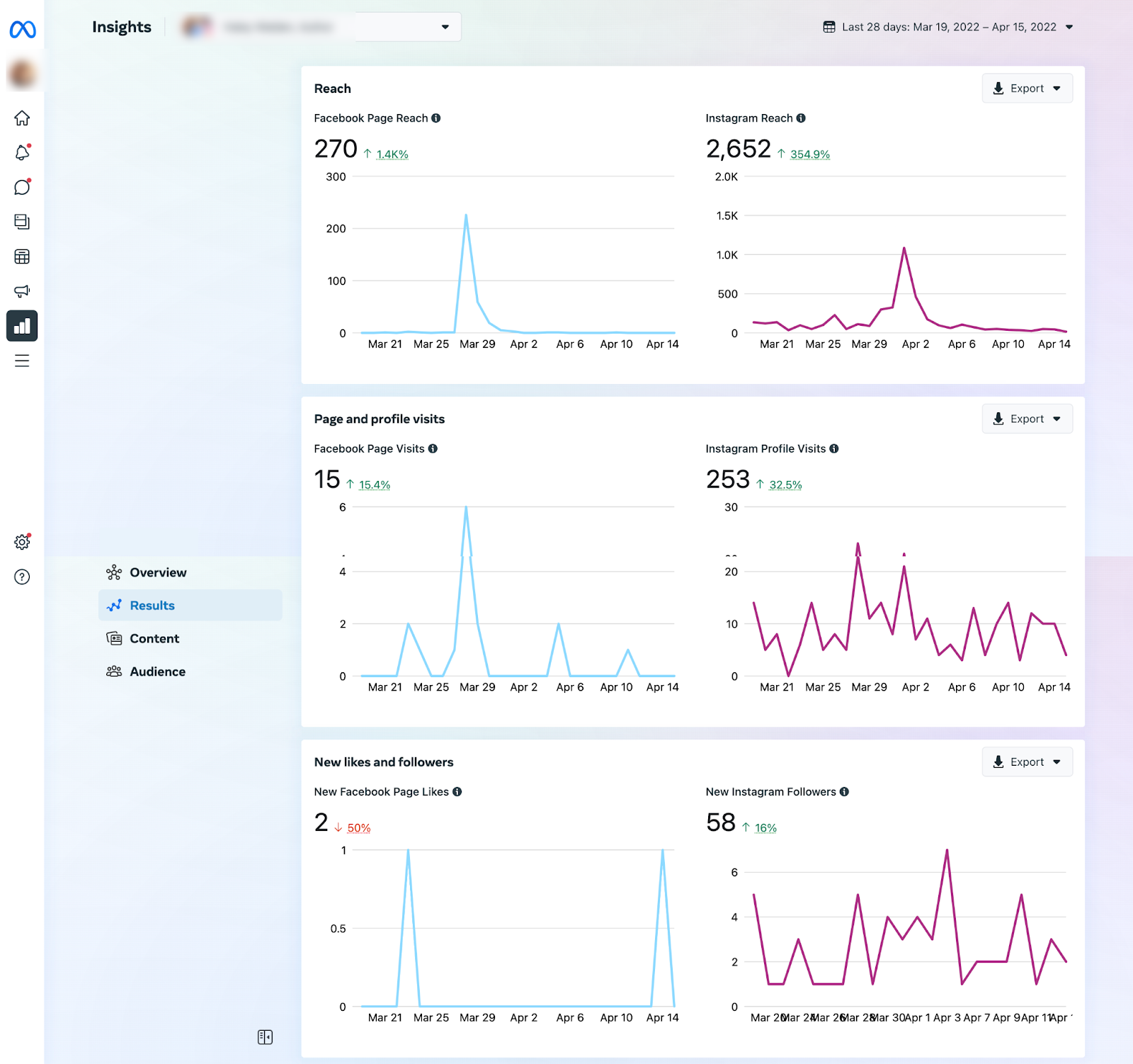
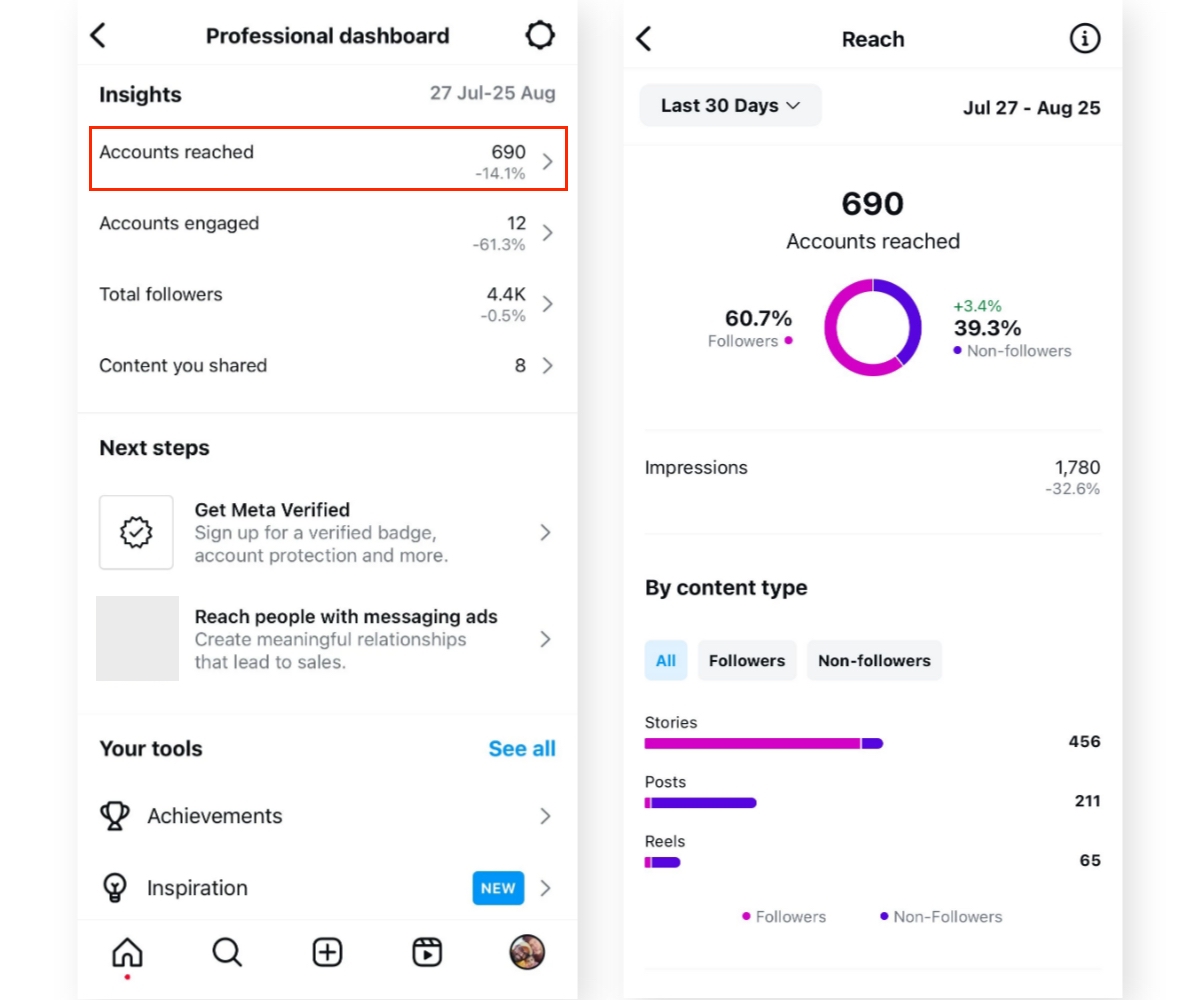
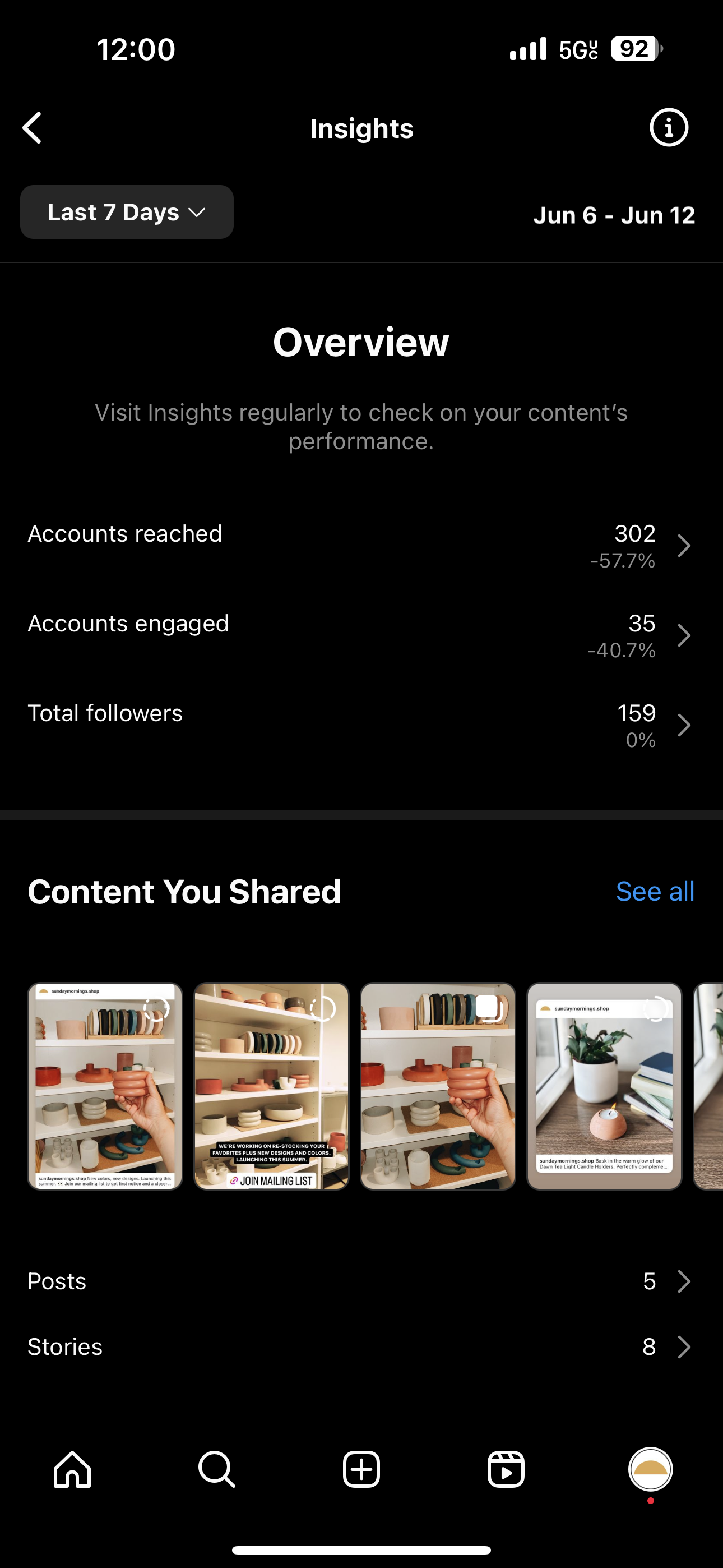
Look for the "Insights" button directly below your bio and follower count on your profile page. Tapping this button will open the main dashboard. Here, you can immediately see high-level data on Accounts Reached, Accounts Engaged, and Total Followers.
Furthermore, you can drill down into specific content types—Posts, Stories, Reels, and Live videos—to see which format is driving the most success. Always review this section weekly to keep track of trends and shifts in audience behavior.
Where to View Post-Specific Insights
Sometimes you need to know exactly how well one single photo or Reel performed. Getting Instagram Insights at the individual post level provides crucial feedback for content creation.
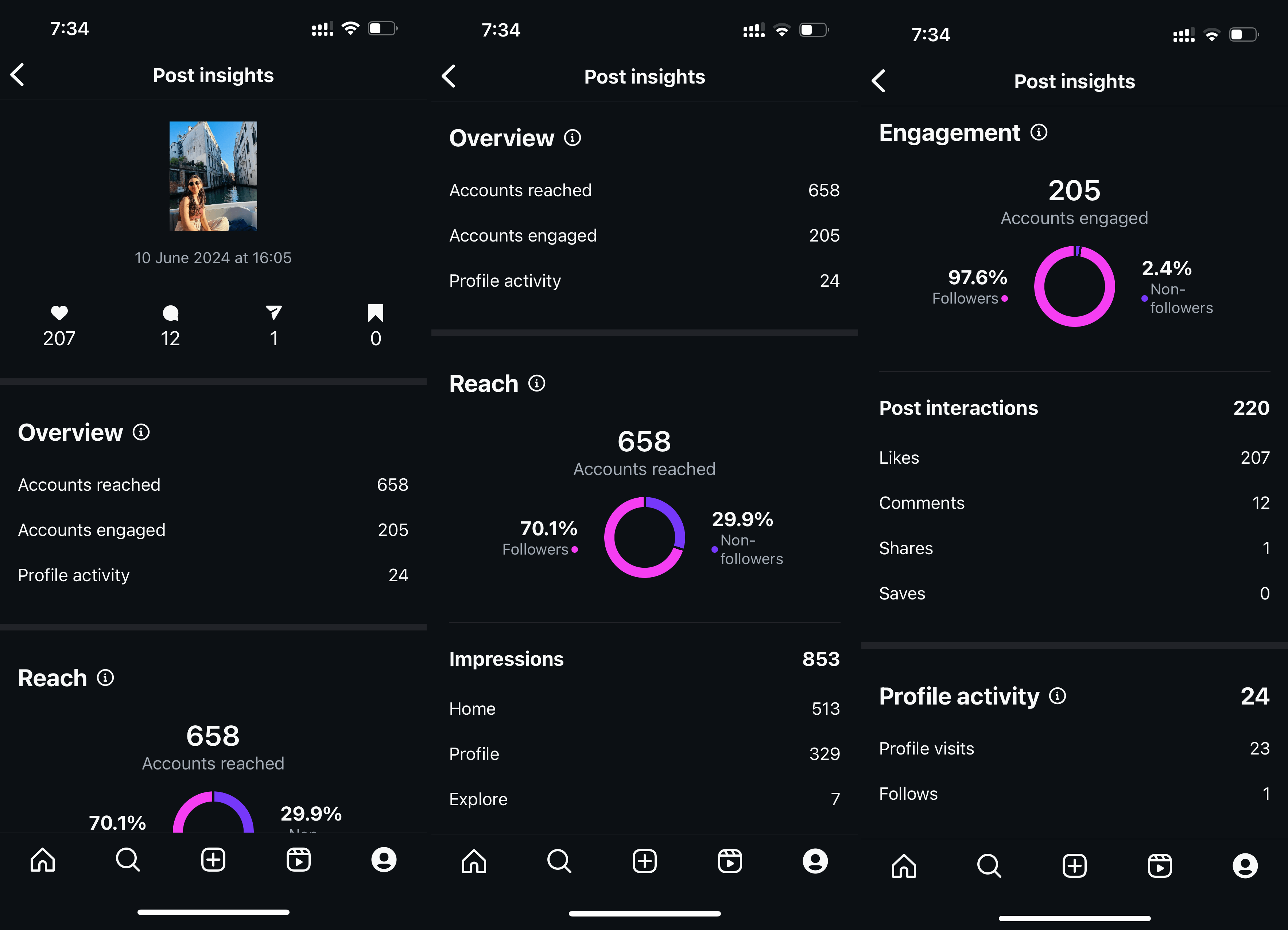
For any content you have posted since switching to a Professional Account, simply tap the post and look for the blue link that says "View Insights" (usually located right below the image or video, next to the Like count). Tapping this will show you detailed metrics just for that piece of content, including the number of saves, shares, and where your audience discovered the content (e.g., from their Home feed, Explore page, or your Profile).
Key Metrics You Need to Track
It's easy to get overwhelmed by all the numbers you see when you check Insights. However, focus on the metrics that truly indicate growth and connection. Mastering these metrics is how you move from just knowing "How Do I Get Instagram Insights" to actually leveraging the data.
Content Interaction Metrics
These metrics show how much your audience values your content and actively uses it. High interaction rates indicate strong engagement and quality content.
- Likes and Comments: The basic indicators of appreciation and discussion.
- Saves: This is a powerful metric. A high save count means people found the content useful enough to reference later, which Instagram interprets as high value.
- Shares: When users share your content to their Stories or DMs, it exposes your profile to new, relevant audiences. This is essentially free marketing!
Audience Data (Demographics, Activity)
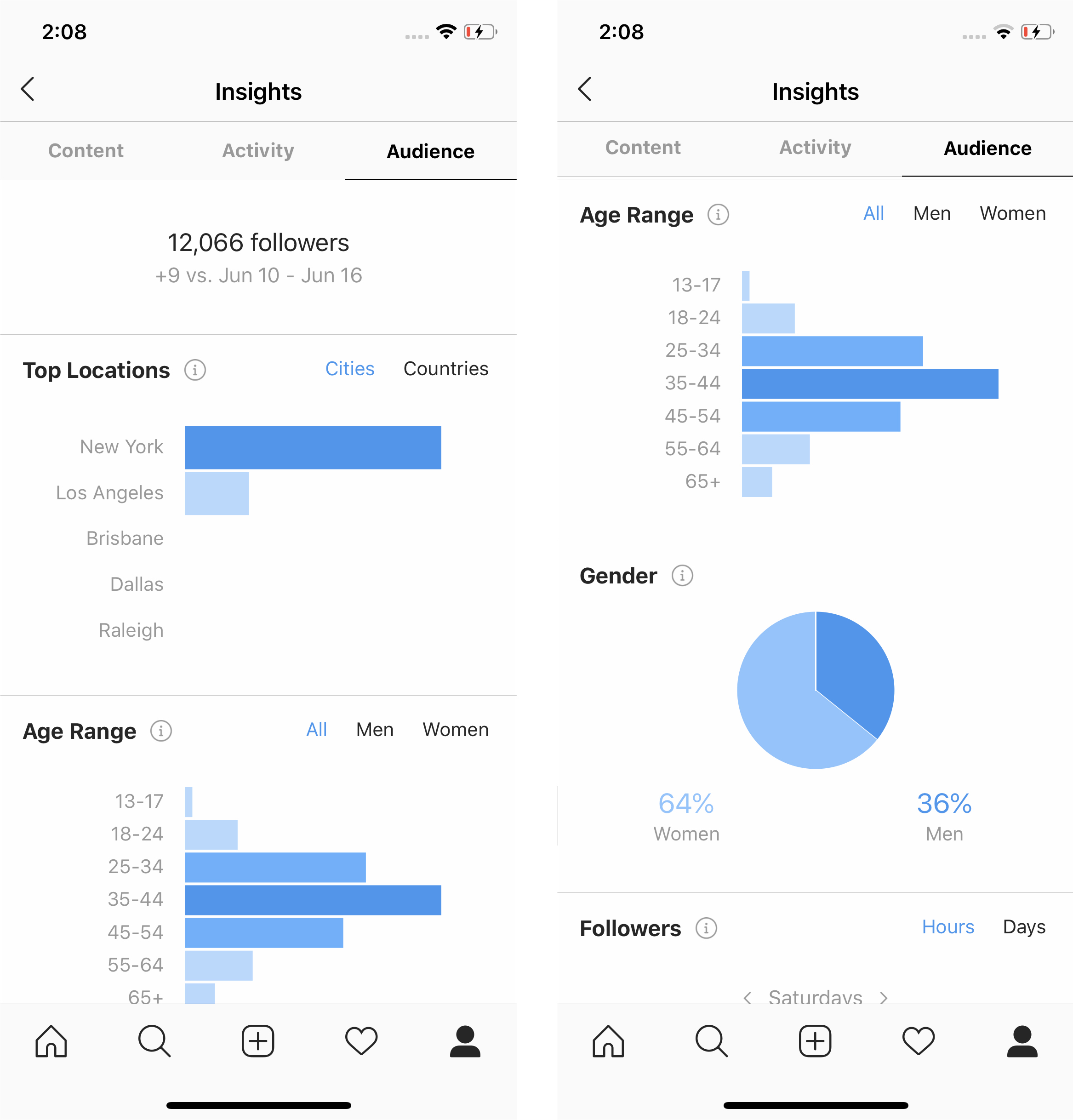
Understanding who your audience is helps you tailor your content better. The Audience tab provides valuable demographic information.
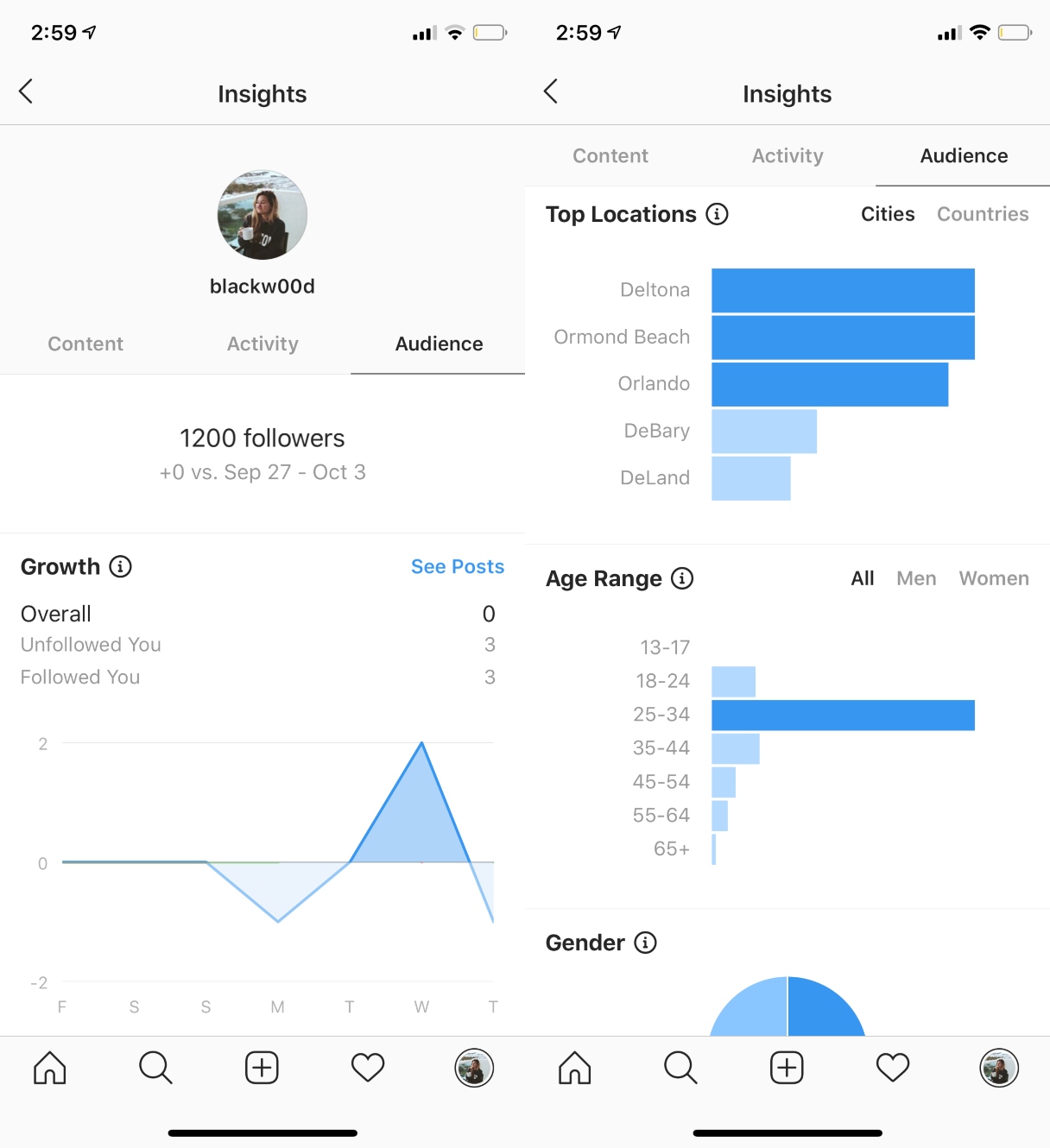
You can view the age range, gender distribution, top locations (cities and countries), and, most importantly, the average times your followers are most active on Instagram. Posting when your audience is awake and scrolling drastically increases your visibility and engagement rates.
Reach and Impressions (The visibility factor)
These are crucial metrics for measuring how widely your content is seen. While they sound similar, there is a fundamental difference between them.
Make sure you understand the difference so you can accurately assess your content performance:
- Reach: The number of unique accounts that saw your post. If 100 people saw your content, your reach is 100. This measures unique viewers.
- Impressions: The total number of times your content was displayed to users. If one person saw your post 5 times, that counts as 5 impressions. This measures total views, including repeats.
A good piece of content will usually have Impressions slightly higher than Reach, but if the gap is massive, it means the same small pool of people are seeing your content repeatedly. If your Reach is growing week over week, you know you are successfully reaching new eyes!
Conclusion: Mastering Your Performance Data
Finding out "How Do I Get Instagram Insights" is only the first step. The real power comes from routinely checking and acting on the data provided. By converting your account to a Professional Profile, navigating the easy-to-use dashboard, and focusing on key metrics like Saves, Shares, and Reach, you gain a massive strategic advantage.
Remember, Instagram Insights is your free market research tool. Use it to eliminate guesswork, understand what content resonates, and ultimately, grow your presence faster and smarter. Start exploring your data today!
Frequently Asked Questions (FAQ) About Instagram Insights
- Can I get Instagram Insights if I have a private account?
- No. To access Instagram Insights, you must switch to a Professional Account (Business or Creator), and your profile must be set to public. Private accounts do not have access to these analytics.
- Do Instagram Insights show data from before I switched to a Professional Account?
- Unfortunately, no. Instagram Insights only starts collecting data from the moment you switch your profile to a Creator or Business Account. Any performance data from when you were a personal profile is not available.
- What is the difference between "Reached Accounts" and "Engaged Accounts" in Insights?
- Reached Accounts refers to the total number of unique users who saw any of your content (post, story, or Reel). Engaged Accounts refers to the unique users who actively interacted with your content (liked, commented, saved, shared, or tapped on a profile link).
- How often should I check my Instagram Insights?
- It is highly recommended that you check your comprehensive dashboard at least once a week to track trends and shifts in audience activity. You should check post-specific Insights (like Reach and Saves) immediately after posting to gauge initial performance.
- Can I use Instagram Insights on my desktop computer?
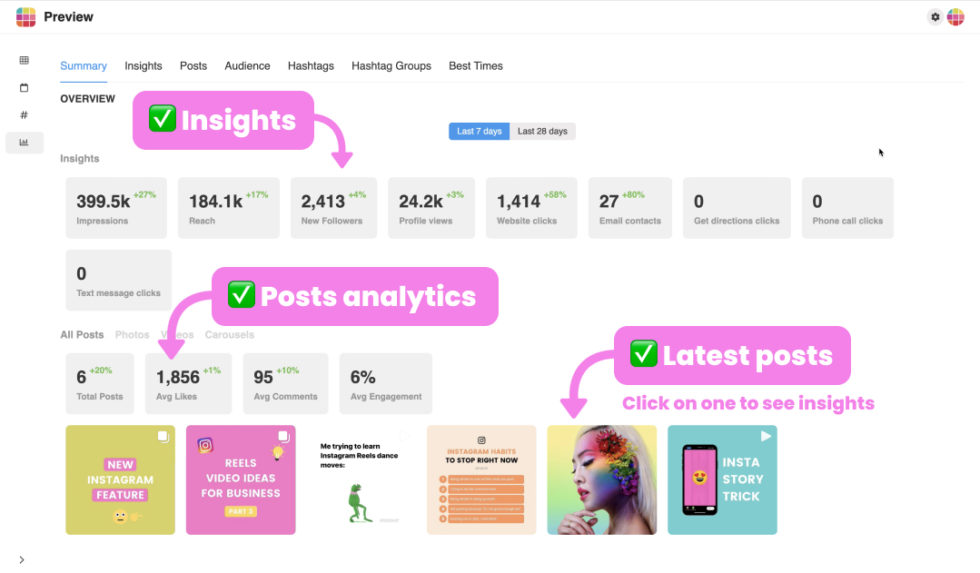
- Yes! While historically Insights was mobile-only, Instagram now offers a limited version of Insights through the Instagram Creator Studio or Facebook Business Suite on a desktop browser. For the most detailed, real-time data, checking via the mobile app is still the easiest option.
How Do I Get Instagram Insights
How Do I Get Instagram Insights Wallpapers
Collection of how do i get instagram insights wallpapers for your desktop and mobile devices.
Beautiful How Do I Get Instagram Insights Background for Desktop
Explore this high-quality how do i get instagram insights image, perfect for enhancing your desktop or mobile wallpaper.
Exquisite How Do I Get Instagram Insights Landscape Digital Art
Find inspiration with this unique how do i get instagram insights illustration, crafted to provide a fresh look for your background.

Vivid How Do I Get Instagram Insights Wallpaper Collection
Discover an amazing how do i get instagram insights background image, ideal for personalizing your devices with vibrant colors and intricate designs.
Vivid How Do I Get Instagram Insights Artwork in 4K
Transform your screen with this vivid how do i get instagram insights artwork, a true masterpiece of digital design.
Captivating How Do I Get Instagram Insights Design for Mobile
This gorgeous how do i get instagram insights photo offers a breathtaking view, making it a perfect choice for your next wallpaper.
Captivating How Do I Get Instagram Insights Picture for Desktop
Immerse yourself in the stunning details of this beautiful how do i get instagram insights wallpaper, designed for a captivating visual experience.
High-Quality How Do I Get Instagram Insights Design in 4K
Discover an amazing how do i get instagram insights background image, ideal for personalizing your devices with vibrant colors and intricate designs.
Crisp How Do I Get Instagram Insights Photo in HD
Find inspiration with this unique how do i get instagram insights illustration, crafted to provide a fresh look for your background.
Mesmerizing How Do I Get Instagram Insights Scene for Your Screen
Transform your screen with this vivid how do i get instagram insights artwork, a true masterpiece of digital design.
Spectacular How Do I Get Instagram Insights Scene Digital Art
Find inspiration with this unique how do i get instagram insights illustration, crafted to provide a fresh look for your background.

Detailed How Do I Get Instagram Insights Design Digital Art
Transform your screen with this vivid how do i get instagram insights artwork, a true masterpiece of digital design.
Exquisite How Do I Get Instagram Insights Scene Nature
This gorgeous how do i get instagram insights photo offers a breathtaking view, making it a perfect choice for your next wallpaper.
Vibrant How Do I Get Instagram Insights View Art
Transform your screen with this vivid how do i get instagram insights artwork, a true masterpiece of digital design.

Dynamic How Do I Get Instagram Insights Photo in 4K
This gorgeous how do i get instagram insights photo offers a breathtaking view, making it a perfect choice for your next wallpaper.

Beautiful How Do I Get Instagram Insights Picture Illustration
Transform your screen with this vivid how do i get instagram insights artwork, a true masterpiece of digital design.
Crisp How Do I Get Instagram Insights Capture in 4K
A captivating how do i get instagram insights scene that brings tranquility and beauty to any device.

Vibrant How Do I Get Instagram Insights Image Collection
Experience the crisp clarity of this stunning how do i get instagram insights image, available in high resolution for all your screens.
Artistic How Do I Get Instagram Insights Image for Mobile
A captivating how do i get instagram insights scene that brings tranquility and beauty to any device.

Gorgeous How Do I Get Instagram Insights Background for Desktop
Immerse yourself in the stunning details of this beautiful how do i get instagram insights wallpaper, designed for a captivating visual experience.
Amazing How Do I Get Instagram Insights Wallpaper in HD
Explore this high-quality how do i get instagram insights image, perfect for enhancing your desktop or mobile wallpaper.
Download these how do i get instagram insights wallpapers for free and use them on your desktop or mobile devices.