How To Get Better Wifi
How To Get Better Wifi: The Ultimate Guide to Speeding Up Your Connection
There are few things more frustrating in the modern world than slow, sluggish internet. Whether you are stuck buffering in the middle of a crucial video call or waiting ages for a page to load, poor Wi-Fi performance can genuinely ruin your day. If you've been asking yourself, how to get better wifi, you've come to the right place.
The good news is that you don't always need to call your internet provider or shell out hundreds of dollars for new equipment. Often, simple adjustments and tweaks can dramatically improve your connectivity. We're going to walk through the easiest, most effective steps you can take right now to boost your signal strength and enjoy lightning-fast speeds throughout your home.
Start Simple: Router Placement and Optimization
Before you dive into complicated settings or buy new hardware, the most effective step is often looking at where your existing router is sitting. Router placement is arguably the single biggest factor influencing your Wi-Fi coverage and reliability. Think of your Wi-Fi signal as sound; the closer you are to the speaker, the clearer the sound.
The Golden Spot: Where Should Your Router Live?
Your router needs clear sightlines and minimal obstructions to broadcast its signal effectively. This is where many people make mistakes, hiding their router in a cupboard or behind a TV stand.
To truly learn how to get better wifi signals, follow these three essential placement rules:
- Centralize It: Place the router as close to the center of your home as possible. This ensures the signal radiates outwards evenly, providing the best coverage to all rooms.
- Elevate It: Wi-Fi signals generally broadcast slightly downwards. Placing the router high up—on a shelf, for example—helps the signal avoid obstacles and travel further.
- Avoid Obstacles: Keep the router away from large metallic objects (fridges, filing cabinets) and thick materials like concrete or stone walls. Water (fish tanks) can also severely dampen the signal.
Keep It Updated: Firmware and Technology
Just like your phone or computer, your router runs on software called firmware. Manufacturers frequently release updates to fix security issues, improve performance, and enhance stability. Running out-of-date firmware is a common reason for speed dips and unreliable connections.
Check your router's manual or log into its admin interface (usually via a web browser) to see if an update is available. Many modern routers can automatically check and apply updates, but older models may require a manual download and installation process.
Dealing with Interference and Congestion
Even with perfect placement, your Wi-Fi signal might still be struggling because of competition. Interference comes in two primary forms: physical interference from other devices, and signal interference from neighboring Wi-Fi networks.
Channel Surfing: Changing Your Router Channels
Wi-Fi signals travel on "channels." In dense areas, like apartment buildings, your neighbors' Wi-Fi networks often use the same default channels as yours (usually 1, 6, or 11). This overlap causes digital traffic jams, slowing everyone down. Changing channels can dramatically improve your speed and latency.
Here's how to find the best channel:
- Use a Wi-Fi analyzer app (available for free on phones or computers) to scan your area.
- Identify which channels are least crowded.
- Log into your router's settings and manually switch the channel to an open or less-used option.
Understanding 2.4 GHz vs. 5 GHz
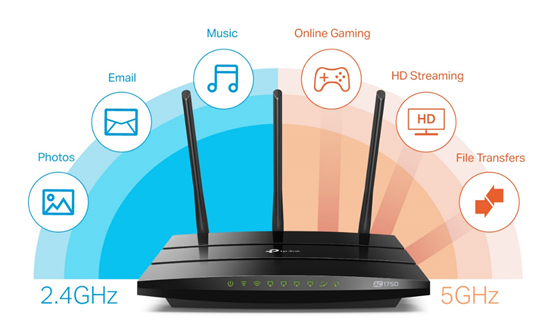
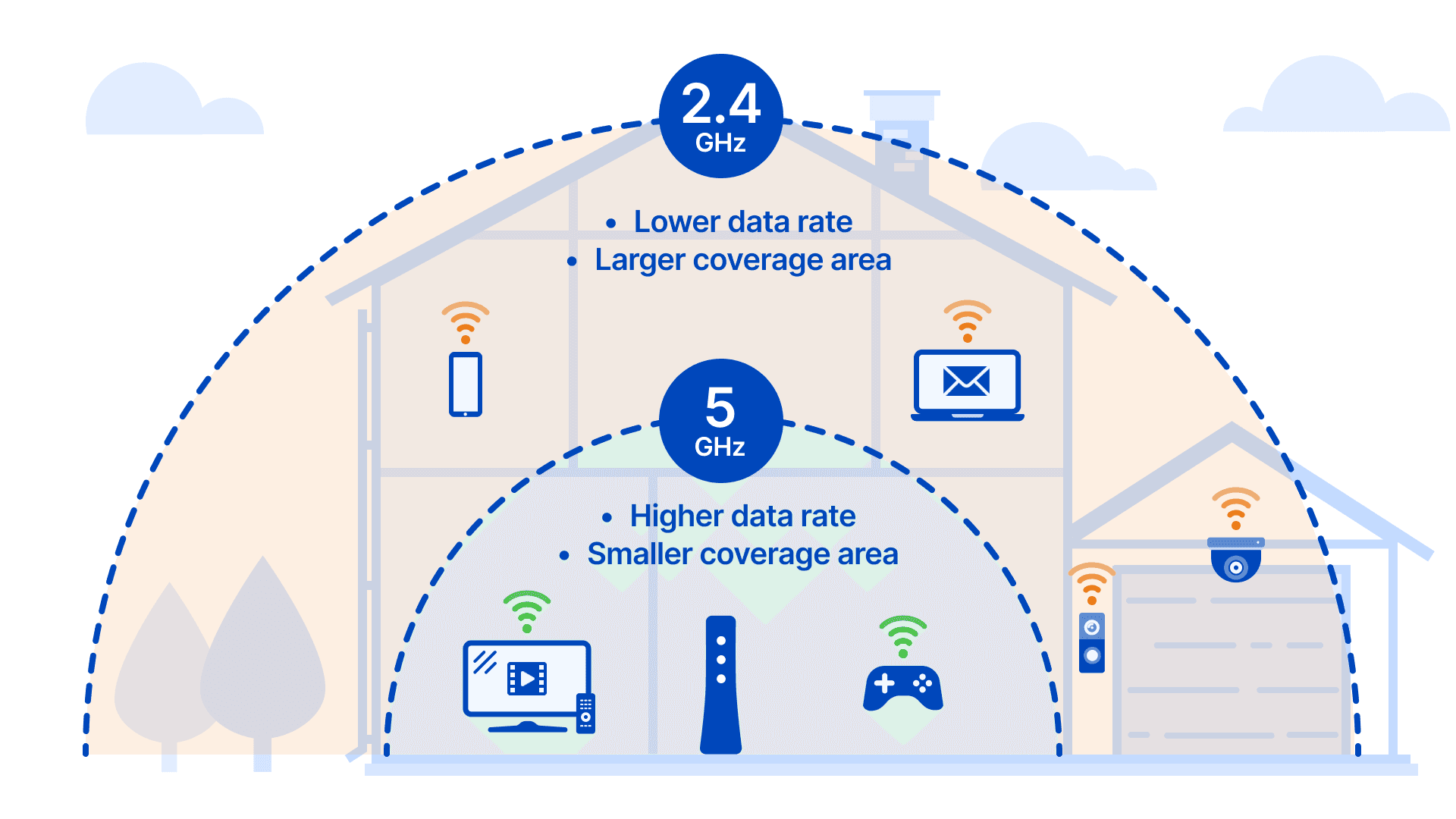
Most modern dual-band routers offer two frequency bands. Understanding the difference is vital for optimizing performance and answering the question of how to get better wifi coverage.
The 2.4 GHz band provides better range and penetration through walls, but it is slower and often more congested (microwaves, Bluetooth devices, and baby monitors use this band). The 5 GHz band offers much faster speeds and less interference, but its range is shorter and it struggles to penetrate solid objects.
Pro Tip: Use the 5 GHz band for high-bandwidth activities (streaming, gaming) on devices close to the router. Use the 2.4 GHz band for devices far away or general web browsing.
Who is Hogging the Bandwidth? (Managing Connected Devices)
The more devices connected to your network, the more your bandwidth is split. Sometimes, a background update on a smart TV or a massive cloud backup on a PC can silently crush your Wi-Fi speeds.
Check your router's interface for a list of connected devices. If you see unrecognized devices, change your Wi-Fi password immediately. Also, look for Quality of Service (QoS) settings. QoS allows you to prioritize traffic, ensuring that your work laptop gets maximum bandwidth over, say, a device downloading a large game update.
Hardware Upgrades for Serious Speed
If you have tried all the settings tweaks and placement changes and still can't figure out how to get better wifi, it might be time to invest in better hardware. Older routers simply cannot handle the demands of modern smart homes with multiple streaming devices.
Upgrade Your Router: Wi-Fi 6 (802.11ax) Explained
If your router is older than three years, it is likely running on an outdated standard like Wi-Fi 5 (802.11ac). Upgrading to a Wi-Fi 6 (802.11ax) router is one of the best ways to future-proof your network.
Wi-Fi 6 isn't just about faster theoretical top speeds; it excels at efficiency. It uses technologies like MU-MIMO and OFDMA to handle dozens of simultaneously connected devices without sacrificing performance. This is crucial for busy households.
Wi-Fi Extenders vs. Mesh Networks (The Right Solution for Your Home)
For large homes or houses with tricky layouts (like L-shaped corridors or basements), a single router won't cut it. You need a system to extend coverage, but choose wisely:
- Wi-Fi Extenders (Repeaters): These are cheaper and easier to set up. However, they simply repeat the existing signal, often halving the bandwidth and creating a separate network name, which can be frustrating.
- Mesh Wi-Fi Systems: These use two or more nodes that communicate with each other to create a single, seamless network across your entire property. They maintain speed across distances and automatically hand off devices to the closest node, providing excellent coverage and reliability. For serious dead zones, Mesh is the superior answer.
Conclusion: Mastering Your Wi-Fi Connection
Improving your Wi-Fi connection doesn't have to be a daunting task. Start with the free, easy fixes like relocating your router to a central, elevated position and ensuring its firmware is current. These small steps often provide significant immediate improvements.
If signal interference from neighbors is the issue, experiment with changing channels or assigning specific devices to the 5 GHz band. Finally, for large homes or dramatically outdated equipment, investing in a Wi-Fi 6 router or a mesh system will ensure you permanently solve the puzzle of how to get better wifi and enjoy fast, stable internet everywhere.
FAQ: Frequently Asked Questions About Better Wi-Fi
- What is the best channel to use for 2.4 GHz Wi-Fi?
- In most situations, channels 1, 6, and 11 are the recommended channels because they are the only non-overlapping channels in the 2.4 GHz spectrum. Using a Wi-Fi analyzer app helps you determine which of these three is least congested in your immediate area.
- Does resetting my router actually help improve performance?
- Yes, it often does. A quick reboot (or power cycle) clears the router's memory, terminates stuck processes, and allows the device to select a better, less-congested channel automatically. It should be the first step in basic troubleshooting.
- Should I use Wi-Fi extenders or a mesh network to improve range?
- For most modern homes needing seamless, high-speed coverage, a mesh network is highly recommended. While extenders are cheaper, they often reduce overall speed and require manual switching between networks. Mesh systems are smarter and more reliable for large areas.
- Can I improve my Wi-Fi speed without upgrading my internet plan?
- Absolutely. All the optimization techniques discussed—better placement, firmware updates, changing channels, and eliminating interference—improve the efficiency of the connection you already pay for. If your internet service provider (ISP) delivers 100 Mbps, better Wi-Fi ensures you actually receive that 100 Mbps across your home.
How To Get Better Wifi
How To Get Better Wifi Wallpapers
Collection of how to get better wifi wallpapers for your desktop and mobile devices.
Mesmerizing How To Get Better Wifi Landscape Digital Art
Discover an amazing how to get better wifi background image, ideal for personalizing your devices with vibrant colors and intricate designs.
High-Quality How To Get Better Wifi View for Your Screen
Discover an amazing how to get better wifi background image, ideal for personalizing your devices with vibrant colors and intricate designs.
Gorgeous How To Get Better Wifi Capture Nature
Find inspiration with this unique how to get better wifi illustration, crafted to provide a fresh look for your background.

Stunning How To Get Better Wifi Wallpaper for Desktop
A captivating how to get better wifi scene that brings tranquility and beauty to any device.
Exquisite How To Get Better Wifi Moment for Your Screen
Find inspiration with this unique how to get better wifi illustration, crafted to provide a fresh look for your background.
Vivid How To Get Better Wifi Picture Nature
Explore this high-quality how to get better wifi image, perfect for enhancing your desktop or mobile wallpaper.
Artistic How To Get Better Wifi Abstract Collection
This gorgeous how to get better wifi photo offers a breathtaking view, making it a perfect choice for your next wallpaper.
Dynamic How To Get Better Wifi Landscape Concept
Find inspiration with this unique how to get better wifi illustration, crafted to provide a fresh look for your background.
Detailed How To Get Better Wifi Abstract Collection
Transform your screen with this vivid how to get better wifi artwork, a true masterpiece of digital design.
Crisp How To Get Better Wifi Abstract Collection
A captivating how to get better wifi scene that brings tranquility and beauty to any device.
High-Quality How To Get Better Wifi Artwork in HD
Explore this high-quality how to get better wifi image, perfect for enhancing your desktop or mobile wallpaper.
Serene How To Get Better Wifi Wallpaper Collection
Experience the crisp clarity of this stunning how to get better wifi image, available in high resolution for all your screens.

Captivating How To Get Better Wifi Artwork for Your Screen
This gorgeous how to get better wifi photo offers a breathtaking view, making it a perfect choice for your next wallpaper.
Gorgeous How To Get Better Wifi Background for Desktop
Find inspiration with this unique how to get better wifi illustration, crafted to provide a fresh look for your background.
Vivid How To Get Better Wifi Wallpaper Illustration
Experience the crisp clarity of this stunning how to get better wifi image, available in high resolution for all your screens.
Crisp How To Get Better Wifi Image Photography
This gorgeous how to get better wifi photo offers a breathtaking view, making it a perfect choice for your next wallpaper.
Amazing How To Get Better Wifi Artwork Nature
Experience the crisp clarity of this stunning how to get better wifi image, available in high resolution for all your screens.
Crisp How To Get Better Wifi Scene for Your Screen
Immerse yourself in the stunning details of this beautiful how to get better wifi wallpaper, designed for a captivating visual experience.
Artistic How To Get Better Wifi Background Nature
This gorgeous how to get better wifi photo offers a breathtaking view, making it a perfect choice for your next wallpaper.
Vivid How To Get Better Wifi View for Mobile
Transform your screen with this vivid how to get better wifi artwork, a true masterpiece of digital design.
Download these how to get better wifi wallpapers for free and use them on your desktop or mobile devices.