How Do You Get A Verified Account On Instagram
How Do You Get A Verified Account On Instagram? Your Complete Step-by-Step Guide
So, you've been scrolling through Instagram and noticed those elusive blue checkmarks next to the names of celebrities, brands, and influencers. That little badge screams authenticity and credibility. If you've been asking yourself, "How do you get a verified account on Instagram?", you're in the right place!
Getting verified isn't just about status; it's about protecting your identity and building immense trust with your audience. The verification badge assures your followers that they are interacting with the official, legitimate presence of a notable figure or brand.
While the process can seem mysterious, Instagram has clear rules. We're going to walk through exactly what you need to do to increase your chances of earning that blue badge, covering everything from core requirements to the application itself.
Understanding Instagram Verification: What It Is and Why You Need It
The blue badge, or verification badge, signifies that Instagram has confirmed the account represents the public figure, celebrity, or brand it claims to be. Think of it as Instagram's way of saying, "This is the real deal."
For brands and individuals, this badge offers several key advantages. It prevents impersonation, dramatically increases brand authority, and makes your profile easier to find in search results.
Essentially, verification tells the world you are important and publicly recognizable. This distinction is critical for maintaining credibility in a crowded digital space.
The Core Requirements for Instagram Verification
Before you even think about submitting your application to get verified on Instagram, your account must meet four non-negotiable criteria laid out by Instagram itself. Failing to meet even one of these requirements means automatic rejection.
It's essential to review these criteria carefully before proceeding, as they form the foundation of your eligibility.
Let's break down the prerequisites that Instagram looks for in every applicant:
- Authentic: Your account must represent a real person, registered business, or entity. No fake accounts, fan pages, or parody accounts are eligible.
- Unique: Only one account per person or business can be verified (with exceptions for language-specific accounts). General interest pages, like meme accounts, are typically not verified.
- Complete: Your account must be public, have a comprehensive bio, a profile photo, and at least one post. Private accounts cannot be verified, as verification requires public presence.
- Notable: This is the big one. Your entity must represent a well-known, highly searched-for person, brand, or entity. Instagram specifically reviews accounts that are featured in multiple news sources—not paid or promotional content.
The 'Notable' requirement is what separates the hopefuls from the verified accounts. You must prove that you are a subject of public interest.
Step-by-Step Guide: How to Apply for Verification
Once you've confirmed you meet the core requirements, the application process itself is surprisingly simple. You complete everything right within the Instagram app, making the submission straightforward and accessible.
Make sure you are logged into the exact account you wish to verify before you begin. Here is the official procedure for how do you get a verified account on Instagram:
- Go to your profile and tap the Menu icon (three horizontal lines) in the top right corner.
- Tap Settings, then navigate to Account, and finally, select Request Verification.
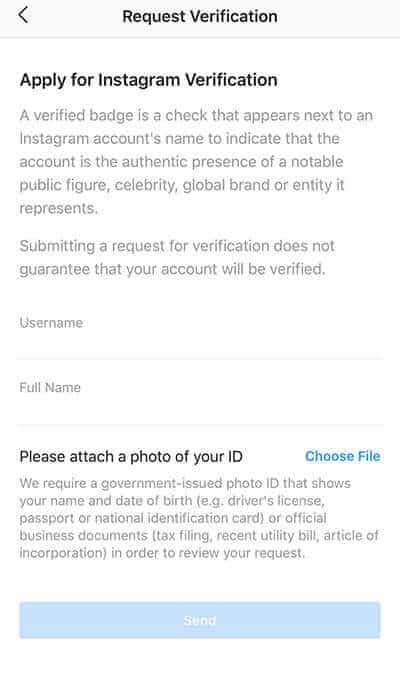
- Fill out the application form thoroughly. You will need to provide your full legal name and upload a required form of identification.
- Provide documentation that proves your notability. You must include links to news articles or press releases where your name or brand is prominently featured.
- Submit the application and wait. Instagram typically reviews applications within a few days to a few weeks, depending on volume.
Remember, submitting the request doesn't guarantee approval. Your application needs to be backed by solid proof of notability, which is why preparing ahead of time is absolutely crucial for success.
Preparing Your Account to Get Verified on Instagram

The 'notable' factor is where most people stumble. Instagram's algorithm and review team specifically search for third-party coverage. If your name or brand isn't appearing prominently in established news outlets, you need to work on your public relations strategy immediately.
Consider engaging a PR team or focusing efforts on getting media coverage that is earned, not purchased. This coverage must be recent and relevant.
Also, make sure your social presence is optimized. Remove links to other social platforms (like Twitter or Facebook) from your Instagram bio, especially if those accounts aren't critical to your identity. Instagram wants to verify the Instagram account, not your entire social portfolio.
Crucial Documentation Checklist
The documentation you provide is the physical proof of your identity. When you request verification, you must upload a government-issued photo ID (like a driver's license or passport) if you are an individual.
For businesses, you'll need official business documents, such as tax filings, a recent utility bill in the business name, or articles of incorporation. This proves your entity is legally registered.
Additionally, you must select the category that best fits your profile (e.g., media, sports, government, business, influencer). This helps Instagram categorize your notability correctly. Be honest and choose the most relevant option to assist the reviewers.
What Happens After You Apply for Verification?
After submitting your verification request, you enter the waiting game. Instagram does not communicate during the review process, which can be frustrating, but this is standard procedure.
Instead, you will receive a direct notification in your Instagram inbox letting you know if your application was approved or denied. Be sure to check your notifications regularly.
The review team assesses two main things: your submitted identity documents and your public notability. They will actively search for your name or brand across major news sources to determine if you meet their internal metrics for being "highly searched-for."
Dealing with Rejection and Reapplying
If you receive a denial notification, don't panic! This is incredibly common, as Instagram maintains a very high standard for verification. Receiving a rejection means you just didn't meet the "notability" threshold yet.
The good news is that Instagram allows you to reapply 30 days after receiving a rejection. You cannot apply sooner, so use this waiting period wisely to strengthen your profile.
Focus on creating high-quality content, ensuring your name is featured prominently in reputable press coverage, and growing your authentic following. The 30-day period is your chance to become demonstrably more "notable."
Warning: Avoid Verification Scams and Paid Services
It is crucial to understand that Instagram verification is entirely free. Never trust third-party services or individuals claiming they can guarantee you a blue checkmark for a fee.
Not only are these often scams aimed at stealing your money or account details, but paying for verification violates Instagram's Terms of Service and could lead to your account being permanently penalized or disabled.
The only legitimate answer to how do you get a verified account on Instagram is by applying directly through the app, following the official process we detailed above. Stay safe and avoid shortcuts!
Conclusion: Summarizing How Do You Get A Verified Account On Instagram
Achieving that blue checkmark requires preparation, patience, and genuine notability. We've covered everything you need to know about how do you get a verified account on Instagram, from meeting the core criteria (Authentic, Unique, Complete, Notable) to navigating the application form.
Your journey to verification is about proving your identity and public relevance. Remember that consistent, high-profile media coverage is your best asset in demonstrating notability to the review team.
If you follow these steps, remain patient, and truly represent a high-profile public entity, you stand a great chance of joining the verified elite and securing your place as the official version of yourself or your brand on Instagram.
Frequently Asked Questions About Instagram Verification
- How long does it take to hear back after requesting verification?
- Instagram states that the review process can take anywhere from a few days up to 30 days. You will receive a direct notification in the app once a decision has been made, so there is no need to contact customer support.
- Does having a large follower count guarantee verification?
- No. While a large following can contribute to notability, it is not the deciding factor. Instagram prioritizes press coverage and public interest (being highly searched-for) over follower count alone. Small accounts can be verified if they are highly notable.
- Can I pay someone to get me verified?
- Absolutely not. Instagram verification is a free service provided by Meta. Any service offering guaranteed verification for money is fraudulent and should be avoided, as paying violates official Instagram policy.
- If I get verified, can I lose the badge?
- Yes. If you change your username, transfer the verified badge to another account, or violate Instagram's Community Guidelines, the verification badge can be removed permanently. It is important to maintain compliance.