How To Get Music On Instagram Story
How To Get Music On Instagram Story: The Ultimate Easy Guide
Are you ready to level up your Instagram Stories? Adding the perfect background track can transform a simple photo or video clip into an engaging, emotional moment that captures your audience's attention. If you've ever wondered, "How To Get Music On Instagram Story?" you're definitely in the right place.
The good news is that Instagram makes this process incredibly simple thanks to its dedicated Music Sticker feature. This feature grants you access to millions of licensed songs, ready to be added to your content. We're going to walk you through every step, from selecting your song to troubleshooting common issues, ensuring your stories are always vibing.
Why Adding Music Matters for Your Instagram Stories

In the highly visual world of Instagram, sound is often the secret sauce for maximizing engagement. Music helps set the mood, convey emotion, and immediately grab the viewer's focus. Think of it as providing context for your visual content.
A short clip of your morning coffee feels more cozy with a gentle acoustic track. A highlight reel of your weekend adventure needs an upbeat, energetic anthem. Utilizing the music feature allows you to tell a richer, more compelling story, encouraging viewers to watch until the very end.
Plus, when viewers see a song they love, they often tap the sticker to learn more, driving even higher interaction rates on your story.
Step-by-Step Guide: How To Get Music On Instagram Story Using the Sticker
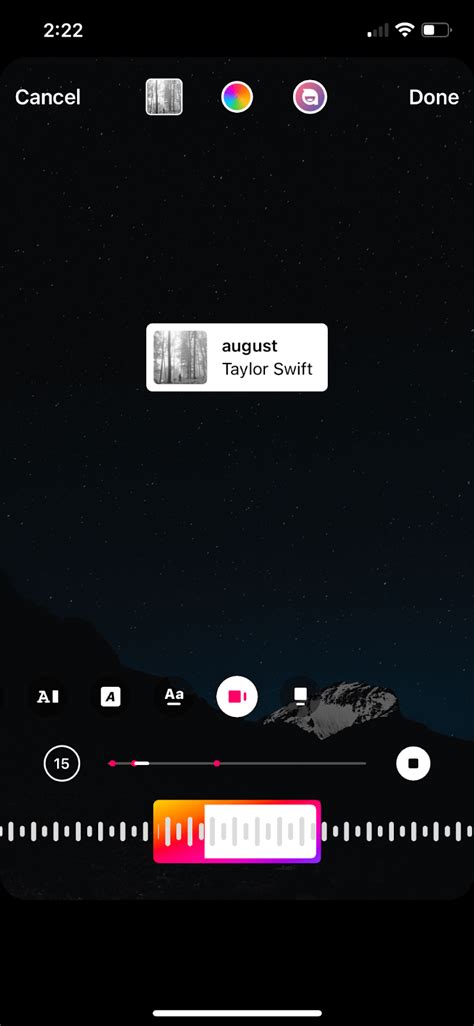
Adding music is incredibly intuitive once you know where the tool is located. Follow these simple steps, whether you're an iOS or Android user, to flawlessly add a tune to your next post.
Step 1: Create or Select Your Story Content
First things first: open the Instagram app and swipe right from your feed to access the Story camera. Capture a new photo or video, or swipe up to select existing media from your phone's gallery. Once your visual content is ready, it's time for the audio magic.
Step 2: Accessing the Sticker Tray
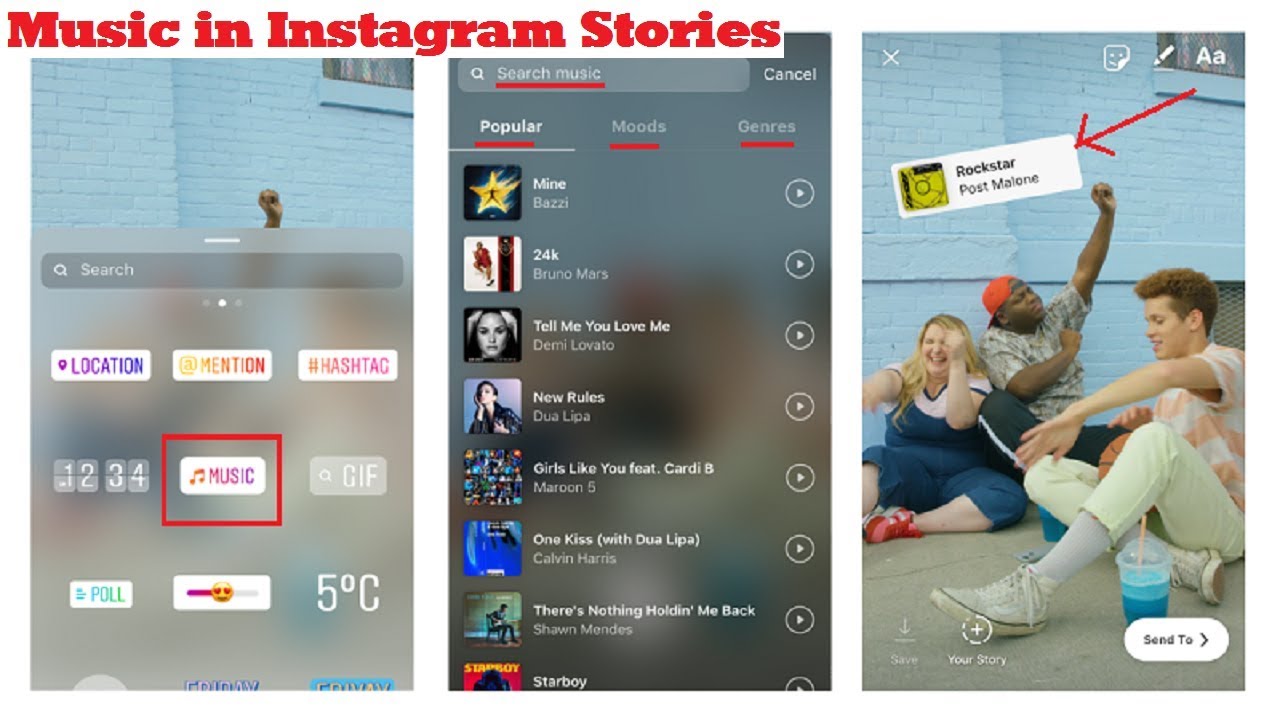
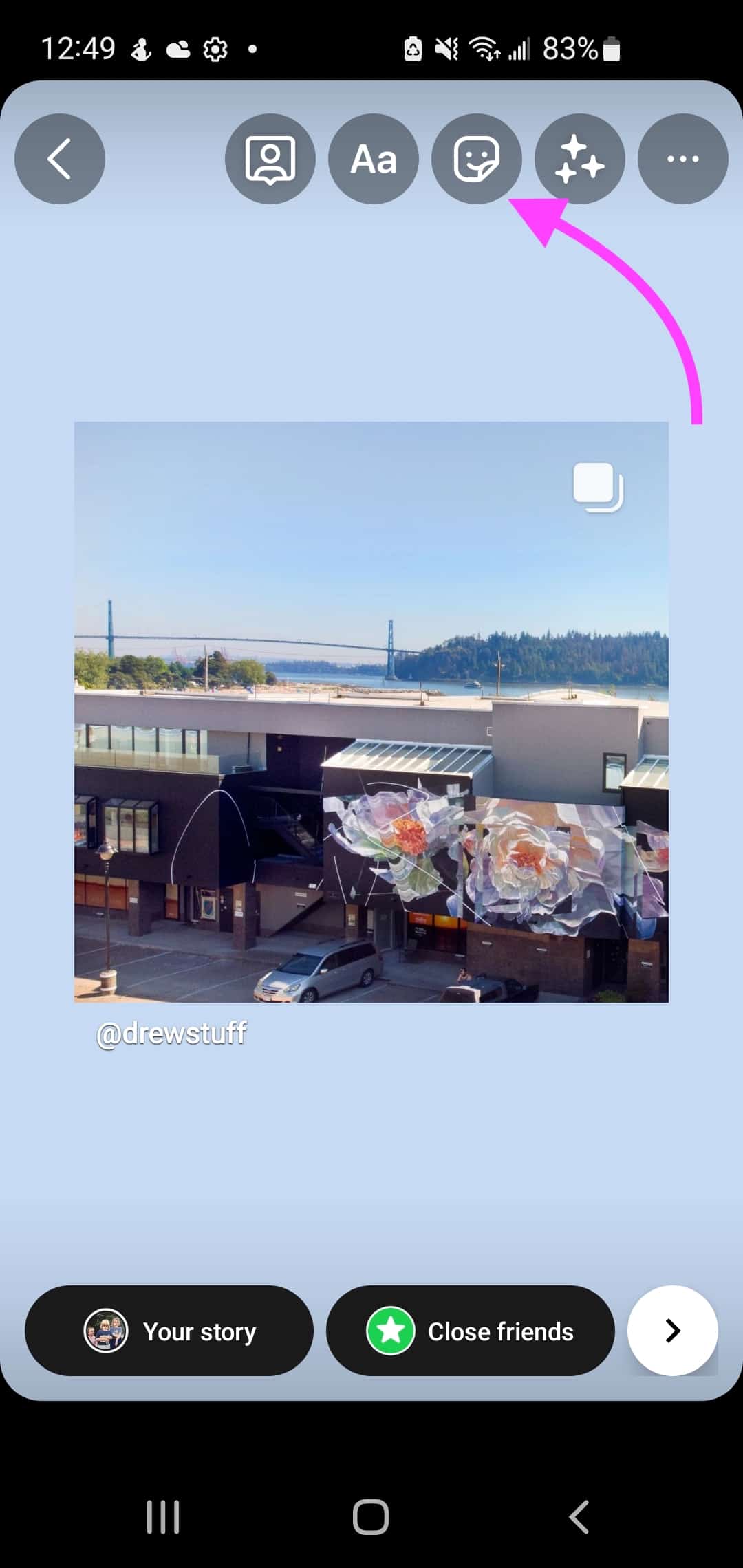
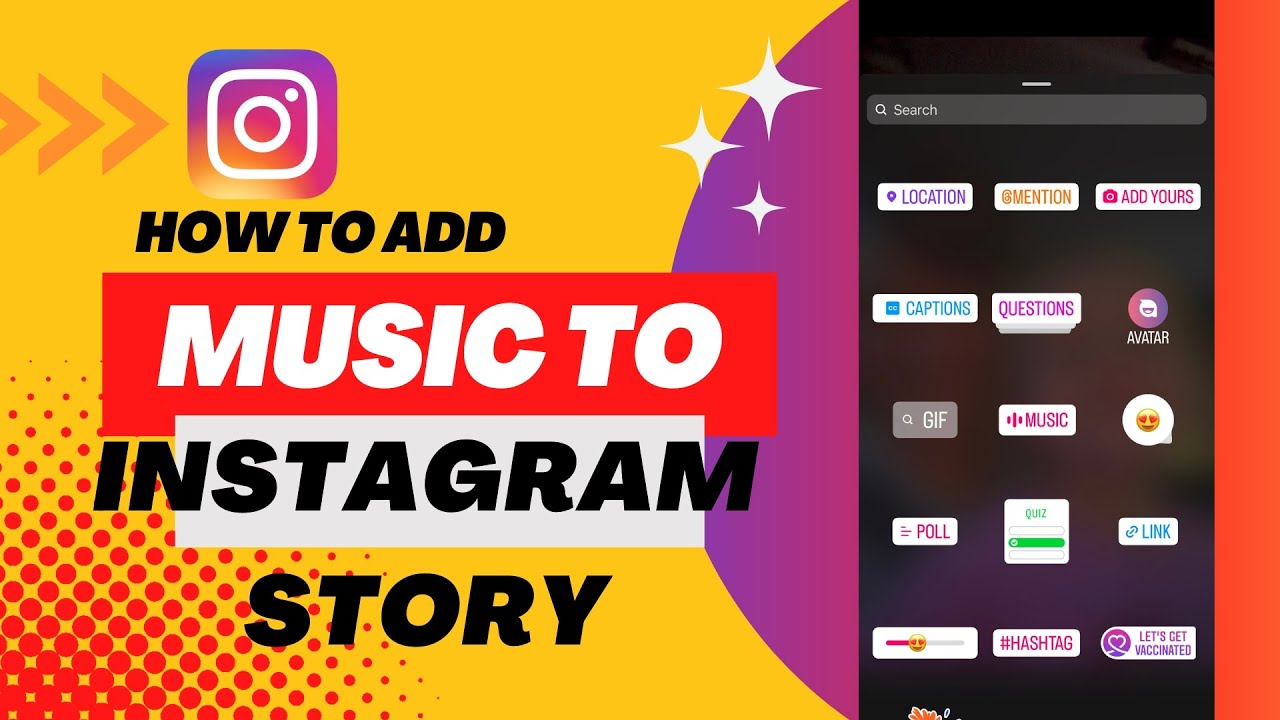
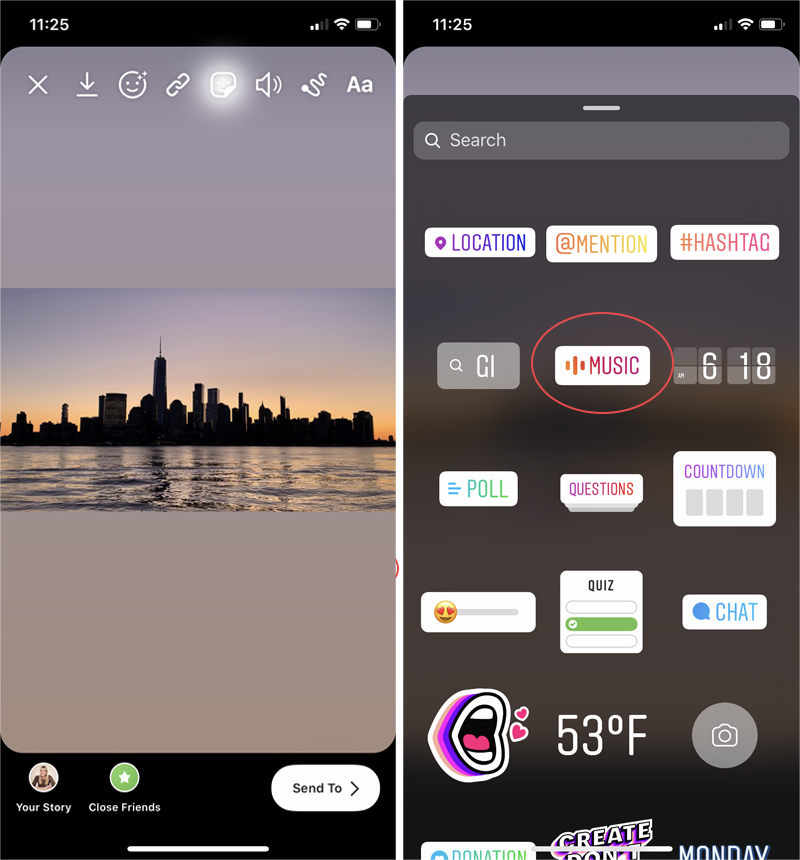
After your content is on the screen, look for the Sticker icon. This usually looks like a square smiley face, located at the top of the editing screen. Tapping this will open the sticker tray, which houses features like location tags, polls, and, most importantly, the Music Sticker.
Locate and tap the sticker labeled "MUSIC."
Step 3: Finding the Perfect Track
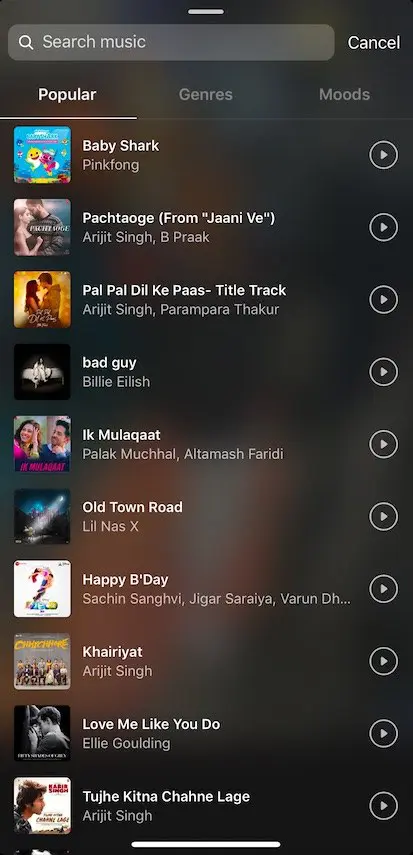
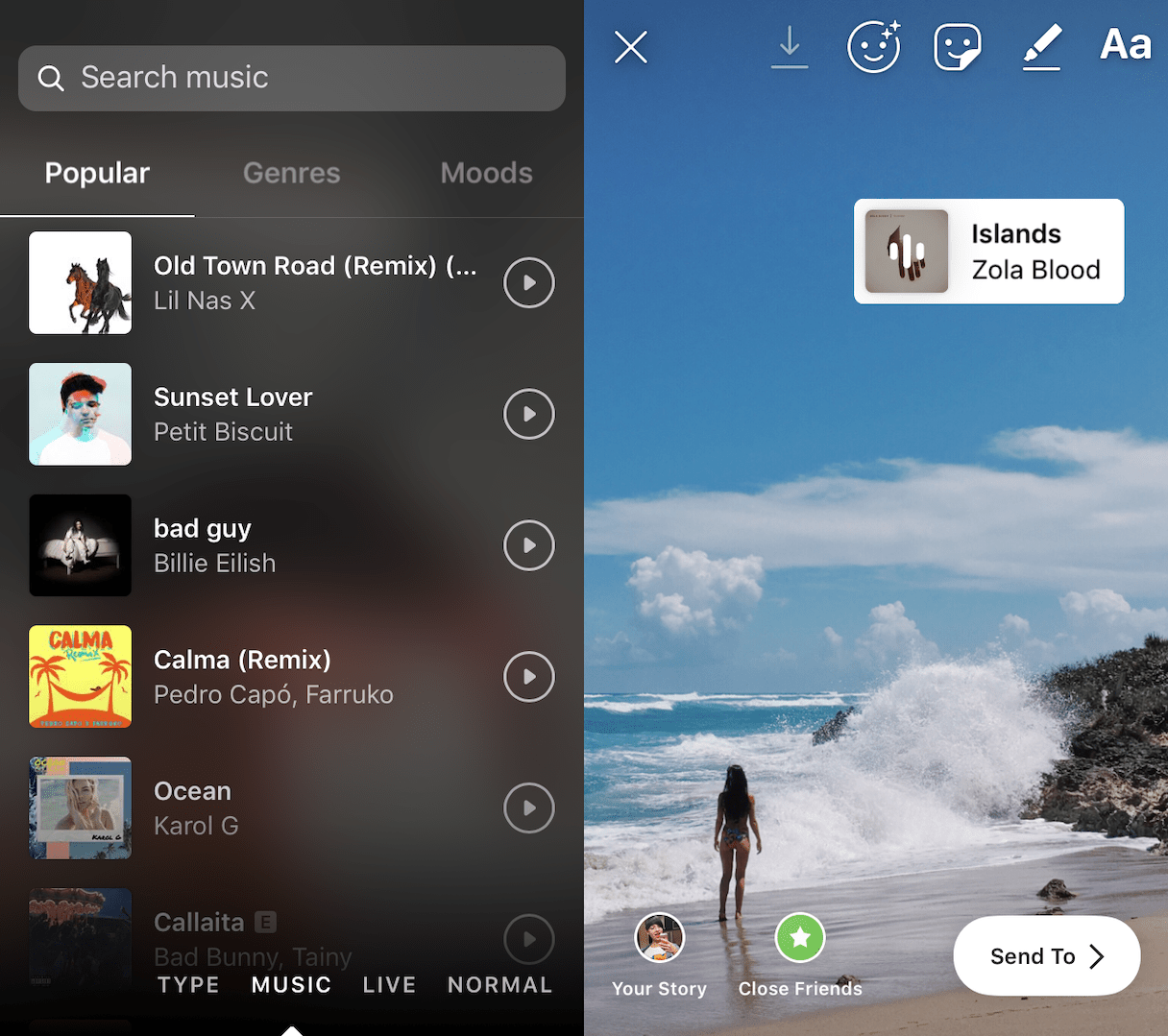
Once you tap the Music Sticker, Instagram presents you with a massive library of songs. You can browse tracks using several categories:
- Popular: Shows currently trending songs that other users are adding.
- Genres: Filters music by category, like Pop, Hip Hop, Jazz, or R&B.
- Moods: Great for when you need a specific feeling, such as Chill, Energetic, or Romantic.
- Search Bar: If you know exactly what you want, type the song title or artist name here.
Tap a song to preview it. When you find the one you love, select it.
Step 4: Customizing the Music Playback and Visuals
This is where you refine how your song appears and sounds in your story. You have control over both the audio segment and the visual display.
Audio Customization:
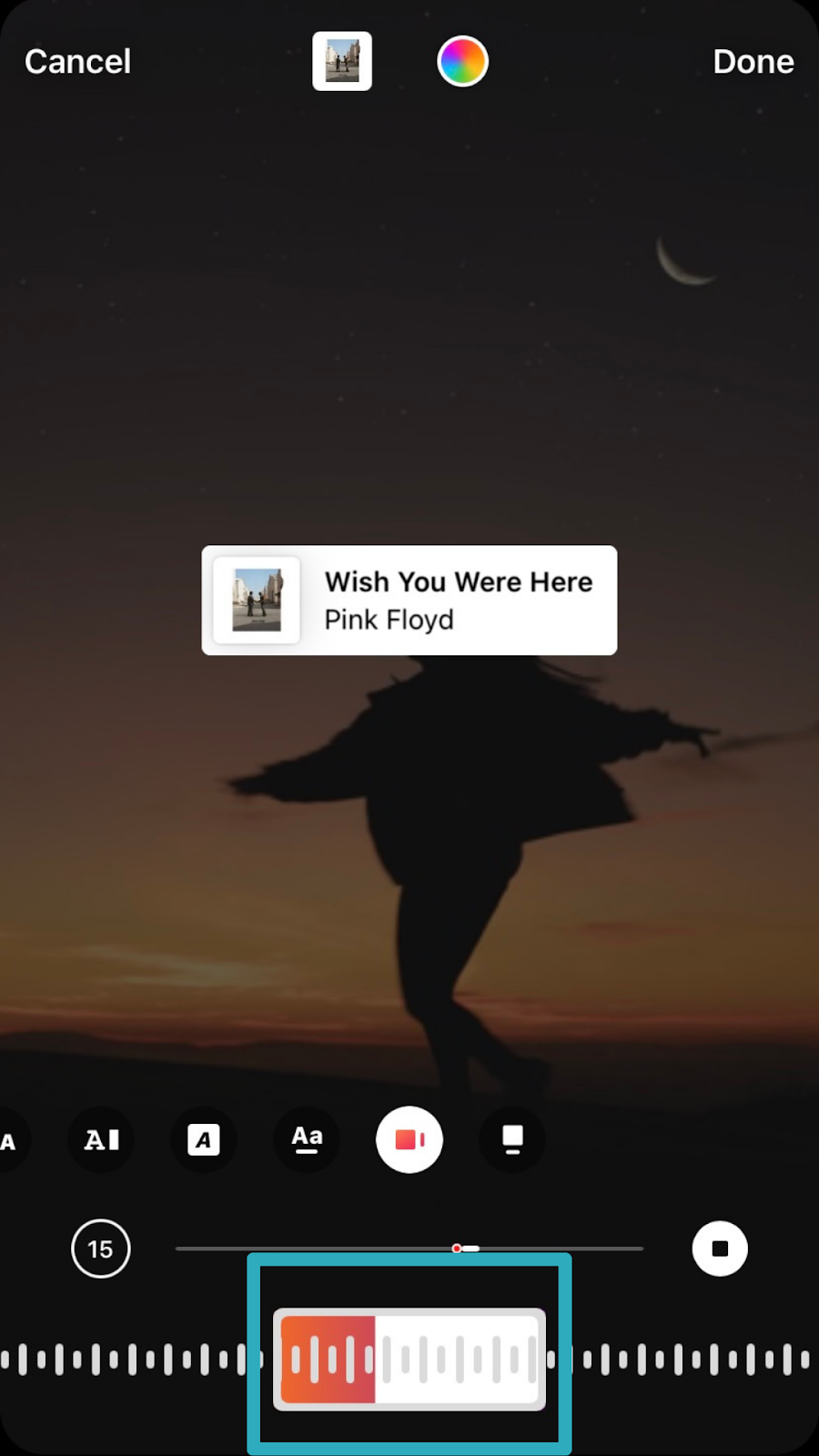
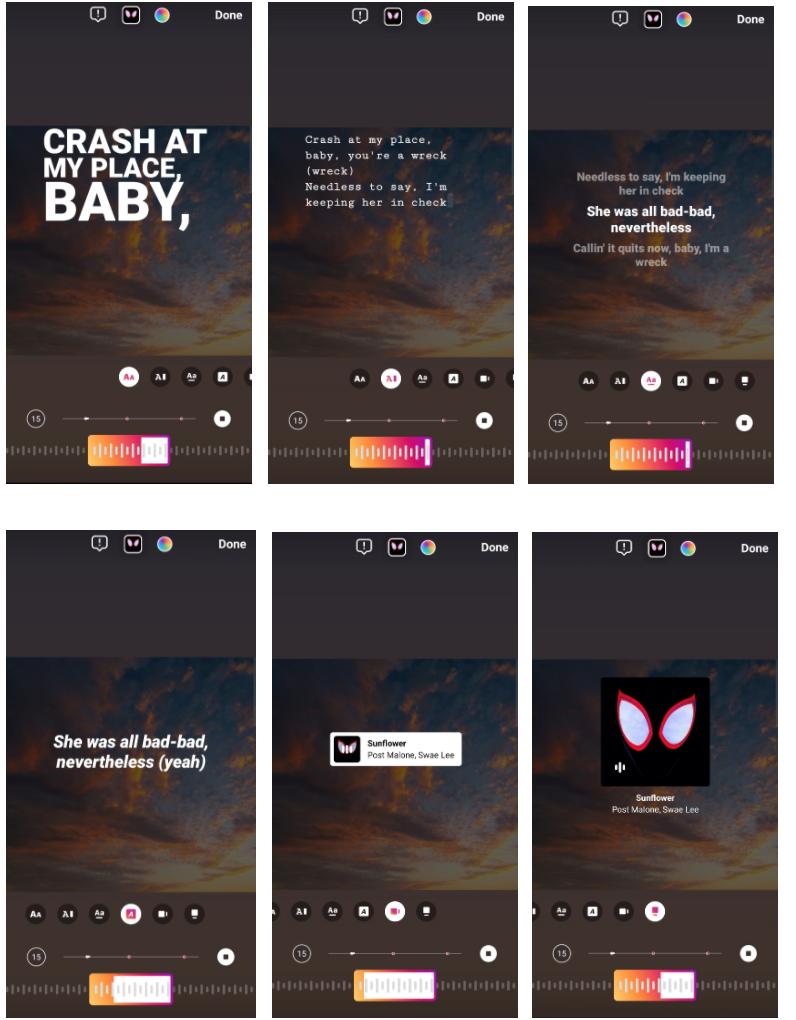
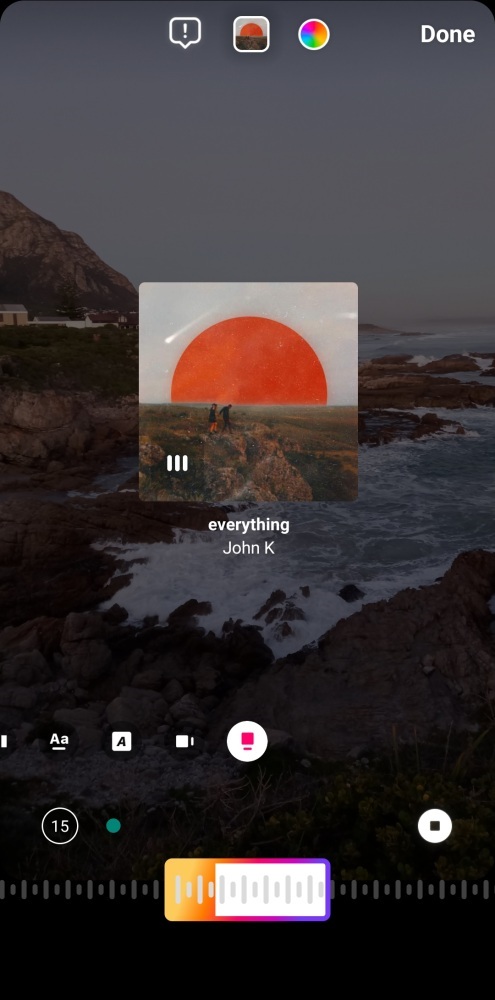
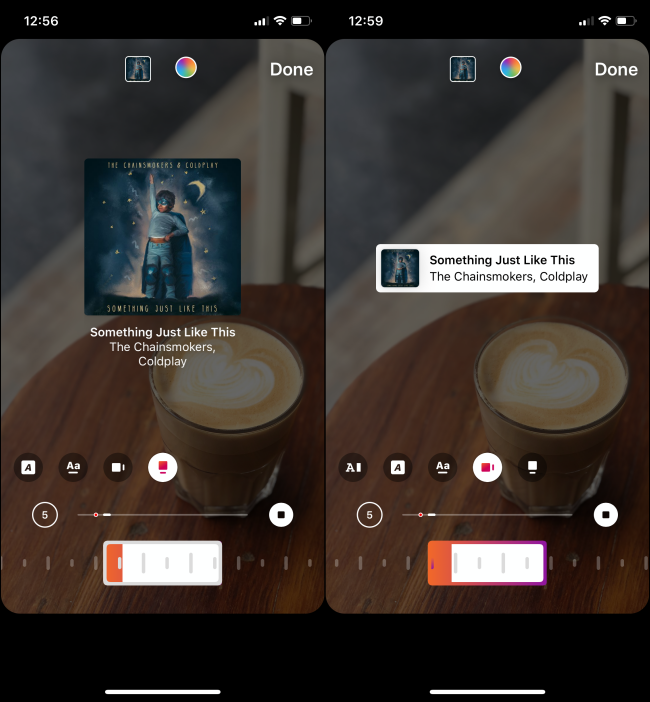
- Segment Selector: A timeline scrubber will appear at the bottom. Use this to choose the specific 15-second clip (or less, depending on the story duration) of the song you want to play.
- Duration: You can adjust the length of the clip, usually between 5 and 15 seconds, using the small circle icon on the left of the scrubber.
Visual Customization:
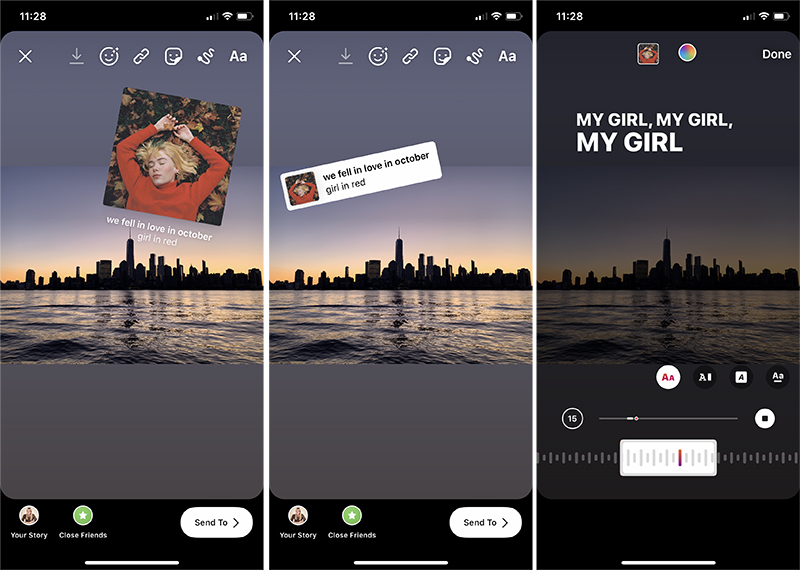
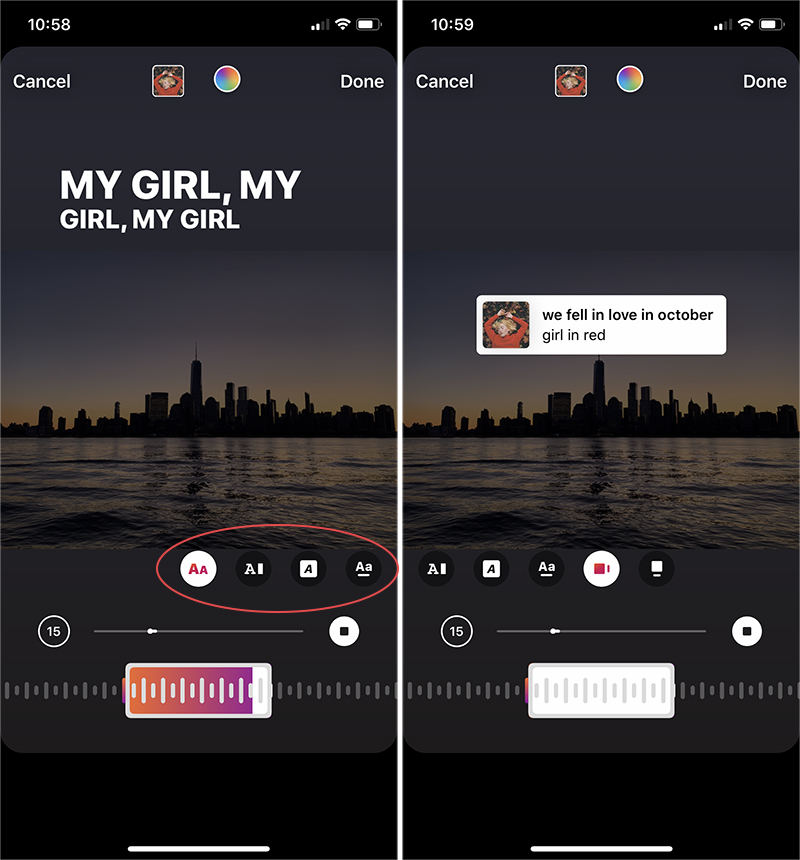
Instagram offers various ways to display the music sticker. Tap the various icons above the scrubber to cycle through options:
- Displaying the Album Art (small or large).
- Showing the Song Title and Artist Name.
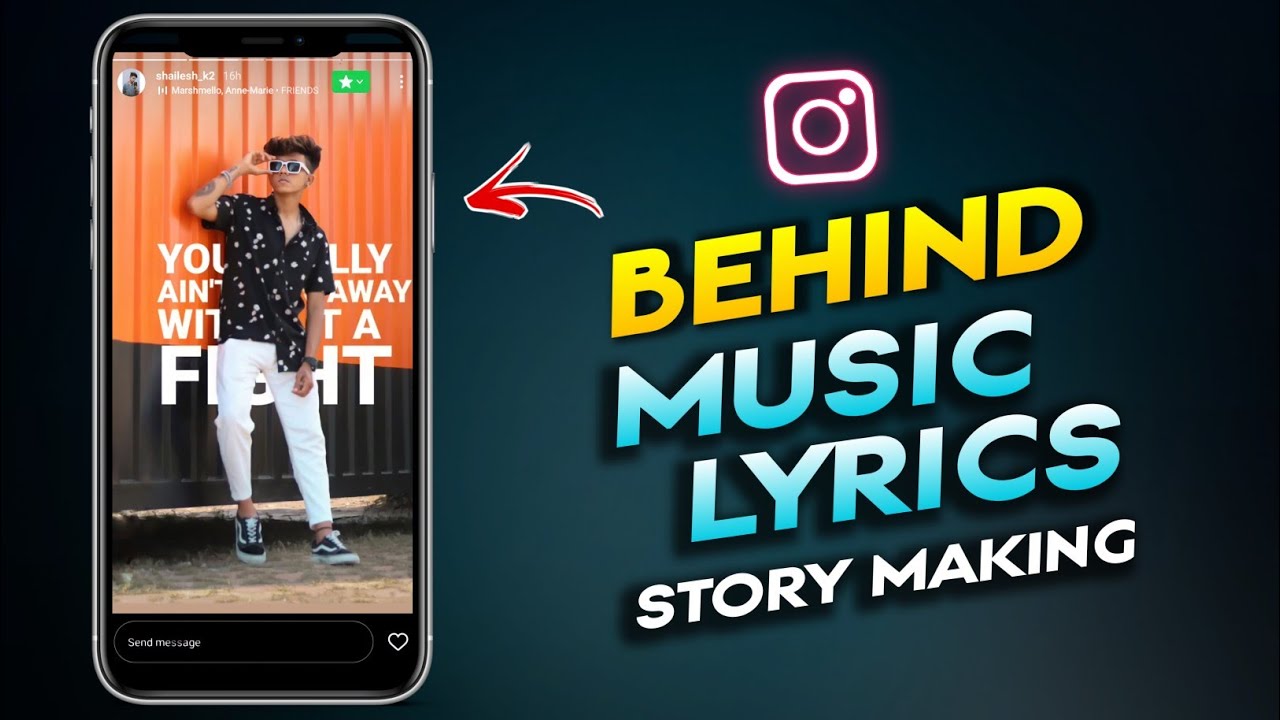
- Lyrical Display: The lyrics scroll across the screen in real-time. You can often change the font and color of the lyrics.
Once everything looks perfect, tap "Done" in the top right corner. You can now resize, rotate, or move the sticker anywhere on your screen before sharing your masterpiece!
Troubleshooting: What If I Don't See the Music Sticker?
Sometimes, users face frustration when they follow all the steps but the music option is nowhere to be found. Don't worry, this is usually due to a few common factors that are easily resolved.
Check Your App Version and Updates
The first and easiest fix is to ensure your Instagram app is fully updated. New features like the music library often require the latest version of the application. Go to your device's app store (Google Play Store or Apple App Store) and check for pending Instagram updates.
If updating doesn't work, try restarting your phone or logging out of and back into the Instagram app.
Understanding Geo-Restrictions and Account Types
This is often the main culprit for missing features. Due to licensing agreements, the Instagram Music library is not available in all countries. If you are traveling or live in a region where licensing is still pending, the feature may be temporarily or permanently unavailable.
Another major factor is your account type. Business accounts sometimes face restrictions on using popular music due to commercial licensing issues. If you are running a Business or Creator account and can't find the sticker, try switching back to a Personal account temporarily to see if the feature reappears. If it does, you will need to rely on royalty-free music or use music only available to commercial accounts.
Creative Ways to Use Music in Your Stories
Knowing How To Get Music On Instagram Story is just the first step. The real fun comes in using the feature creatively to enhance your content:
- "Guess the Song" Poll: Hide the music sticker completely behind an image or object, but let the sound play. Use the Poll sticker to ask your followers to guess the title.
- Lyric Emphasis: When using the lyric feature, resize the lyrics so they fill the screen, making them the main focus of the post. This is perfect for dramatic or emotional reveals.
- Seamless Transitions: If you are posting several short video clips back-to-back, use the same music track across all of them to create a continuous, rhythmic flow.
- Subtle Background Vibe: Shrink the music sticker down to its absolute smallest size and drag it just off-screen (but still visible by a sliver) or cover it with another sticker to maintain a clean aesthetic while still providing sound.
Experimentation is key! The way you blend music with visuals can dramatically change how your story resonates with your audience.
Conclusion
Adding music to your Instagram Stories is arguably the simplest yet most effective way to boost engagement and make your content feel professionally polished. Whether you are sharing a quick moment from your day or promoting a new product, knowing How To Get Music On Instagram Story is an essential skill.
Remember to simply tap the sticker icon, choose the Music Sticker, and spend a few moments customizing the perfect 15-second clip. If the sticker is missing, check your app updates and account type. Now go out there and give your followers something great to listen to!
Frequently Asked Questions (FAQ) About Instagram Story Music
- Can I use any song I want from Spotify on my Instagram Story?
- No. You must use the music available directly within Instagram's licensed music library via the Music Sticker. This ensures that the artists are compensated and that your post adheres to copyright laws. However, Instagram's library is vast and usually includes most popular songs.
- How long can the music clip be?
- The music clip can be anywhere from 5 to 15 seconds long. If your story video is less than 15 seconds, the music will automatically adjust to the length of the video.
- I accidentally covered the music sticker. Will the song still play?
- Yes, absolutely. Once the music is added and posted, the sound plays automatically for the viewer regardless of whether the sticker is visible or hidden by other elements, or even dragged off-screen.
- Why did my older Instagram Story lose the music?
- Instagram Stories older than 24 hours are archived. While the video or photo content remains, the music audio may occasionally be stripped out due to expiring licensing agreements or regional viewing issues when viewing very old archived stories.
- Can Business accounts use all the same music as Personal accounts?
- Not always. Business and Creator accounts often have a restricted music library containing only royalty-free or commercial-use tracks to avoid legal issues related to music usage for promotional purposes. If you need a specific copyrighted song, you may need to temporarily revert to a Personal account.
How To Get Music On Instagram Story
How To Get Music On Instagram Story Wallpapers
Collection of how to get music on instagram story wallpapers for your desktop and mobile devices.
Lush How To Get Music On Instagram Story Scene in HD
This gorgeous how to get music on instagram story photo offers a breathtaking view, making it a perfect choice for your next wallpaper.
Serene How To Get Music On Instagram Story Abstract Concept
Explore this high-quality how to get music on instagram story image, perfect for enhancing your desktop or mobile wallpaper.
Dynamic How To Get Music On Instagram Story Wallpaper Digital Art
This gorgeous how to get music on instagram story photo offers a breathtaking view, making it a perfect choice for your next wallpaper.
Amazing How To Get Music On Instagram Story Photo in HD
Explore this high-quality how to get music on instagram story image, perfect for enhancing your desktop or mobile wallpaper.
Amazing How To Get Music On Instagram Story Artwork Concept
Discover an amazing how to get music on instagram story background image, ideal for personalizing your devices with vibrant colors and intricate designs.
Stunning How To Get Music On Instagram Story Photo for Mobile
Immerse yourself in the stunning details of this beautiful how to get music on instagram story wallpaper, designed for a captivating visual experience.

Lush How To Get Music On Instagram Story Image Nature
Find inspiration with this unique how to get music on instagram story illustration, crafted to provide a fresh look for your background.
Artistic How To Get Music On Instagram Story Wallpaper for Your Screen
Find inspiration with this unique how to get music on instagram story illustration, crafted to provide a fresh look for your background.
Dynamic How To Get Music On Instagram Story Photo Digital Art
This gorgeous how to get music on instagram story photo offers a breathtaking view, making it a perfect choice for your next wallpaper.

Mesmerizing How To Get Music On Instagram Story Abstract for Mobile
Transform your screen with this vivid how to get music on instagram story artwork, a true masterpiece of digital design.
Breathtaking How To Get Music On Instagram Story Capture Digital Art
Transform your screen with this vivid how to get music on instagram story artwork, a true masterpiece of digital design.
Vibrant How To Get Music On Instagram Story Photo Art
Explore this high-quality how to get music on instagram story image, perfect for enhancing your desktop or mobile wallpaper.
Gorgeous How To Get Music On Instagram Story Scene Collection
Immerse yourself in the stunning details of this beautiful how to get music on instagram story wallpaper, designed for a captivating visual experience.
Vivid How To Get Music On Instagram Story Abstract for Desktop
Discover an amazing how to get music on instagram story background image, ideal for personalizing your devices with vibrant colors and intricate designs.

High-Quality How To Get Music On Instagram Story Moment for Mobile
Transform your screen with this vivid how to get music on instagram story artwork, a true masterpiece of digital design.
Stunning How To Get Music On Instagram Story Picture Collection
This gorgeous how to get music on instagram story photo offers a breathtaking view, making it a perfect choice for your next wallpaper.

Crisp How To Get Music On Instagram Story Moment Concept
A captivating how to get music on instagram story scene that brings tranquility and beauty to any device.
Detailed How To Get Music On Instagram Story Scene Illustration
Experience the crisp clarity of this stunning how to get music on instagram story image, available in high resolution for all your screens.
Lush How To Get Music On Instagram Story Scene for Mobile
This gorgeous how to get music on instagram story photo offers a breathtaking view, making it a perfect choice for your next wallpaper.

Crisp How To Get Music On Instagram Story Wallpaper for Mobile
Find inspiration with this unique how to get music on instagram story illustration, crafted to provide a fresh look for your background.
Download these how to get music on instagram story wallpapers for free and use them on your desktop or mobile devices.