How To Get Your Podcast On Spotify
How To Get Your Podcast On Spotify: The Ultimate Step-by-Step Guide
So, you've poured your heart, time, and sound mixing skills into creating an awesome podcast. Congratulations! But if your show isn't yet available on Spotify, you're missing out on a massive audience. Spotify is no longer just a music platform; it is arguably the biggest destination for podcast listening worldwide.
Getting your show listed might seem technical, but I promise it's straightforward if you follow the right steps. This comprehensive guide will walk you through the entire process, ensuring you know exactly How To Get Your Podcast On Spotify and start growing your reach today. Let's dive in!
Step 1: Laying the Foundation – What You Need First
Before you even think about logging into Spotify, you need two fundamental components set up. These are non-negotiable requirements for distributing your audio content across any major platform.
Choosing the Right Podcast Host
A podcast host is where your actual audio files live. Platforms like Apple Podcasts, Google Podcasts, and Spotify do not store your files; they simply pull them from your host. Choosing a reliable host is the most important decision you'll make when learning How To Get Your Podcast On Spotify.
Popular hosting platforms include:
- Buzzsprout: Known for its user-friendly interface and detailed analytics.
- Libsyn: One of the oldest and most reliable platforms, favored by professionals.
- Anchor (now Spotify for Podcasters): Often free, making it ideal for beginners, though analytics can be basic.
- Simplecast or Transistor: Great for brands and serious podcasters looking for comprehensive tools.
Ensure your chosen host meets the minimum requirements set by Spotify, primarily focusing on file format (MP3) and proper ID3 tagging.
Generating Your RSS Feed
The RSS (Really Simple Syndication) feed is the digital pipeline that connects your host to Spotify. This unique URL contains all the information about your podcast—your cover art, episode titles, descriptions, and the links to your audio files.
Your hosting provider automatically generates this RSS feed for you. You typically find this link within your host's dashboard settings under "Distribution" or "Settings." Copy this link carefully; you'll need it in the next step.
Before submitting, double-check that your RSS feed includes the following crucial metadata:
- Podcast title and description.
- High-quality square cover art (usually 1400x1400 minimum).
- Correct category tagging (e.g., Comedy, Education, News).
- An email address for administrative verification purposes.
Step 2: Submitting Your Podcast to Spotify
Now that your foundational elements are ready, it's time to officially connect your show to the massive Spotify ecosystem. This is where the magic happens!
Accessing Spotify for Podcasters
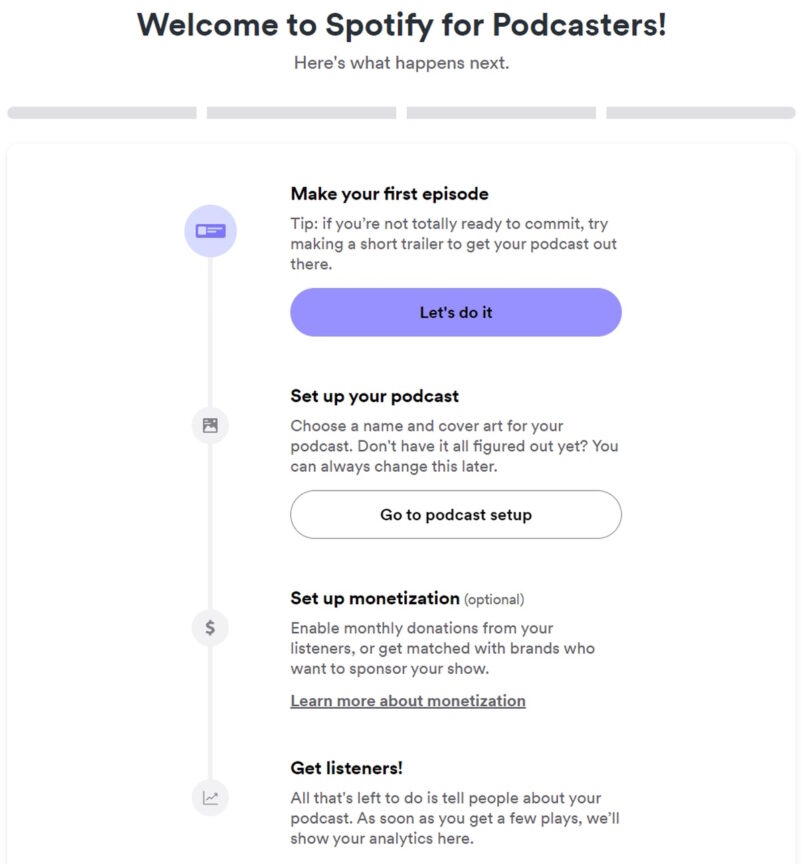
Spotify manages all podcast submissions through a dedicated platform formerly known as Anchor, now integrated into the main service: Spotify for Podcasters. You will need a standard Spotify user account to log in here.
Follow these steps once you are logged in:
- Navigate to the "Get Started" button or the "Catalog" section if you've used the tool before.
- Select "Submit Your Podcast."
- You will be prompted to paste your unique RSS feed URL that you copied from your hosting provider.
Spotify will immediately validate the feed. If there are any errors in the feed structure or missing metadata (like cover art), they will flag it now, giving you a chance to fix it on your hosting platform before proceeding.
The Verification Process
Spotify needs to ensure you actually own the podcast you are trying to submit. This prevents malicious submissions or accidental uploads.
After pasting your RSS feed, Spotify will send a verification code to the email address listed in your RSS feed data. This is typically the email associated with your podcast host account, not necessarily your personal Spotify account email.
Go check that specific inbox, retrieve the 8-digit verification code, and input it into the Spotify for Podcasters submission form. This verifies ownership and allows you to continue the submission process.
The final steps involve confirming the following details that Spotify pulls from your feed:
- Your show's primary category and secondary category.
- The language of the podcast.
- Whether the content is explicit or clean.
- The country where the podcast is primarily produced.
Once you review and confirm these details, hit the final submit button. Congratulations, you've officially completed the technical part of understanding How To Get Your Podcast On Spotify!
Step 3: Optimization and Next Steps
Submission is just the beginning. Now comes the waiting game, followed by proactive steps to ensure your show gets noticed.
Checking the Status and Going Live
After submitting, your podcast enters a review queue. Spotify's review process is typically quite fast, often taking anywhere from a few hours up to 24 hours. However, during periods of high volume, it might take longer.
You can monitor the status of your submission directly within the Spotify for Podcasters dashboard. Once approved, Spotify will send you a confirmation email, and your show will begin to appear in searches worldwide.
It's important to note that once your podcast is accepted, all future episodes are automatically handled by your RSS feed. When you upload a new episode to your host, it pushes the data directly to Spotify (and all other distributors) without you having to manually intervene.
Promoting Your New Spotify Link
Don't wait for listeners to find you; tell them where you are! Once you get your official Spotify URL, make sure you shout it from the rooftops.
Action items for promotion:
- Update your website and social media bios immediately with the Spotify link.
- Create short video snippets mentioning that your show is now available on Spotify.
- Use a universal link aggregator (like Linktree or similar services provided by your host) that features the Spotify icon prominently.
- Mention the Spotify listing in the intro or outro of your next few episodes.
Using the Spotify for Podcasters dashboard, take advantage of the analytics tools. Tracking where your listeners are coming from and which episodes perform best will help you fine-tune your content strategy for the Spotify audience.
Conclusion: Success is Now Streaming
Learning How To Get Your Podcast On Spotify might have seemed daunting, but it's a logical three-step process: establish your host and RSS feed, verify ownership via Spotify for Podcasters, and confirm the details. By securing a spot on Spotify, you're tapping into billions of potential listening hours and positioning your show for massive growth.
Remember that the key to success post-submission is consistency and promotion. Keep producing great content, and use the free analytics provided by Spotify to understand your audience better. Go make some noise!
Frequently Asked Questions (FAQ) About Spotify Podcast Submission
- What if I already use Anchor? Do I still need to submit my RSS feed?
- If you use Anchor, you do not need to manually submit your RSS feed. Anchor is owned by Spotify, and your podcast is automatically listed on Spotify. You can manage your show directly through the Spotify for Podcasters dashboard.
- How long does it take for my new episodes to appear on Spotify?
- Once your podcast is accepted, new episodes typically appear within 30 minutes to an hour after you upload them to your hosting provider. This is because Spotify is constantly monitoring your RSS feed for updates.
- Can I upload a video podcast to Spotify?
- Yes, Spotify fully supports video podcasts. If your hosting platform supports video feeds, Spotify will process them. If you are using Anchor/Spotify for Podcasters, you have direct tools to upload video versions of your episodes.
- Why did my submission get rejected?
- Submissions are usually rejected due to technical issues with the RSS feed. Common reasons include missing cover art, insufficient metadata (empty description), or using an unsupported audio format. Fix the error on your hosting platform and resubmit.
- Do I lose ownership rights by submitting my podcast to Spotify?
- Absolutely not. Spotify (like Apple Podcasts and Google Podcasts) is simply a distribution platform. You retain 100% ownership and copyright of your content, and your hosting provider remains the primary source of your audio files.
How To Get Your Podcast On Spotify
How To Get Your Podcast On Spotify Wallpapers
Collection of how to get your podcast on spotify wallpapers for your desktop and mobile devices.
High-Quality How To Get Your Podcast On Spotify Photo Digital Art
Discover an amazing how to get your podcast on spotify background image, ideal for personalizing your devices with vibrant colors and intricate designs.
Lush How To Get Your Podcast On Spotify Design Art
This gorgeous how to get your podcast on spotify photo offers a breathtaking view, making it a perfect choice for your next wallpaper.

Gorgeous How To Get Your Podcast On Spotify View Concept
This gorgeous how to get your podcast on spotify photo offers a breathtaking view, making it a perfect choice for your next wallpaper.
Amazing How To Get Your Podcast On Spotify Image Art
Discover an amazing how to get your podcast on spotify background image, ideal for personalizing your devices with vibrant colors and intricate designs.

Captivating How To Get Your Podcast On Spotify Background in HD
Find inspiration with this unique how to get your podcast on spotify illustration, crafted to provide a fresh look for your background.

Gorgeous How To Get Your Podcast On Spotify Background for Mobile
This gorgeous how to get your podcast on spotify photo offers a breathtaking view, making it a perfect choice for your next wallpaper.

Spectacular How To Get Your Podcast On Spotify Capture Collection
This gorgeous how to get your podcast on spotify photo offers a breathtaking view, making it a perfect choice for your next wallpaper.
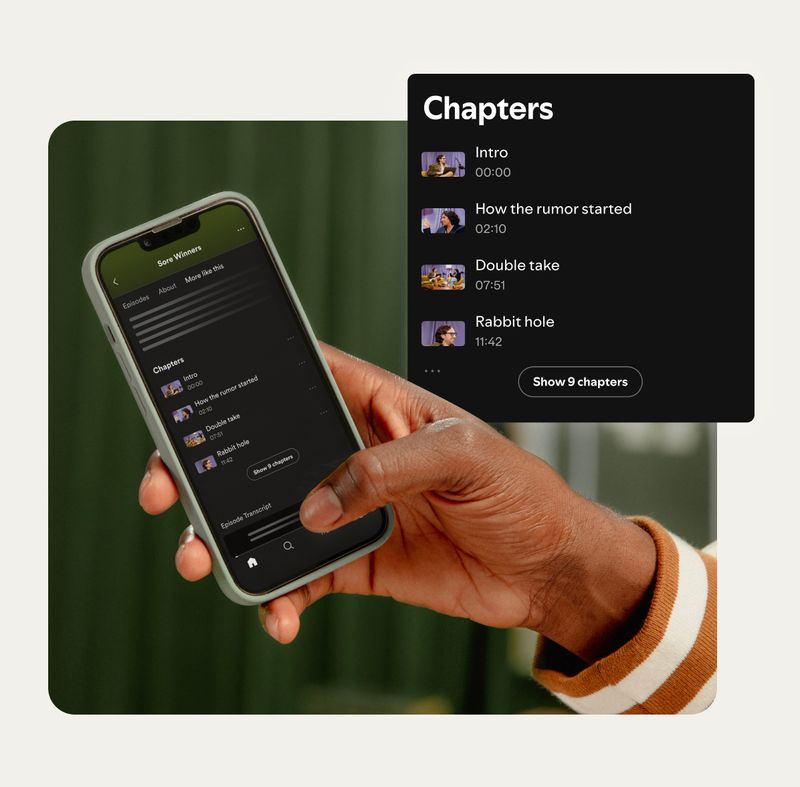
Vibrant How To Get Your Podcast On Spotify Wallpaper in 4K
Discover an amazing how to get your podcast on spotify background image, ideal for personalizing your devices with vibrant colors and intricate designs.

Amazing How To Get Your Podcast On Spotify Scene Nature
Explore this high-quality how to get your podcast on spotify image, perfect for enhancing your desktop or mobile wallpaper.

Gorgeous How To Get Your Podcast On Spotify Abstract in HD
This gorgeous how to get your podcast on spotify photo offers a breathtaking view, making it a perfect choice for your next wallpaper.

Beautiful How To Get Your Podcast On Spotify Background Art
Transform your screen with this vivid how to get your podcast on spotify artwork, a true masterpiece of digital design.
:max_bytes(150000):strip_icc()/spotify-podcast-how-to-download-01-3e44a11a5a554f838848f58c682d13a0.jpg "Mesmerizing How To Get Your Podcast On Spotify Picture Collection")
Mesmerizing How To Get Your Podcast On Spotify Picture Collection
Discover an amazing how to get your podcast on spotify background image, ideal for personalizing your devices with vibrant colors and intricate designs.
Serene How To Get Your Podcast On Spotify Photo Digital Art
Experience the crisp clarity of this stunning how to get your podcast on spotify image, available in high resolution for all your screens.
Vivid How To Get Your Podcast On Spotify Design Photography
Explore this high-quality how to get your podcast on spotify image, perfect for enhancing your desktop or mobile wallpaper.
Detailed How To Get Your Podcast On Spotify Artwork Art
Discover an amazing how to get your podcast on spotify background image, ideal for personalizing your devices with vibrant colors and intricate designs.
Stunning How To Get Your Podcast On Spotify Moment Digital Art
This gorgeous how to get your podcast on spotify photo offers a breathtaking view, making it a perfect choice for your next wallpaper.
Stunning How To Get Your Podcast On Spotify Picture Concept
A captivating how to get your podcast on spotify scene that brings tranquility and beauty to any device.
Stunning How To Get Your Podcast On Spotify Abstract in 4K
This gorgeous how to get your podcast on spotify photo offers a breathtaking view, making it a perfect choice for your next wallpaper.
Spectacular How To Get Your Podcast On Spotify Image in HD
This gorgeous how to get your podcast on spotify photo offers a breathtaking view, making it a perfect choice for your next wallpaper.

Artistic How To Get Your Podcast On Spotify Image Concept
A captivating how to get your podcast on spotify scene that brings tranquility and beauty to any device.
Download these how to get your podcast on spotify wallpapers for free and use them on your desktop or mobile devices.