Defender Antivirus Software
Stop Paying for Antivirus: Is Windows Defender Antivirus Software Finally the Best?
For decades, the standard advice was simple: don't rely on Microsoft's built-in security. You absolutely needed to purchase a third-party suite (like Norton, McAfee, or Kaspersky) to stay safe online. But times change fast, especially in cybersecurity.
Today, the landscape is dramatically different. Windows Defender Antivirus Software—now often simply called Microsoft Defender—has undergone a massive transformation. It's no longer the sluggish, feature-light tool of yesteryear. The big question for 2024 is: Is this free, integrated solution now good enough to fully protect your PC, or are you still missing critical features?
We're taking a deep dive into Microsoft Defender's capabilities, testing its performance against paid competitors, and determining once and for all if your wallet can stay closed when it comes to PC security.
The Evolution of Defender: From Zero to Hero
Windows Defender started as basic anti-spyware, often criticized for poor detection rates and a lack of real-time protection. Microsoft realized that security was no longer an optional add-on but a core component of the operating system's trust model.
Since the launch of Windows 10, and especially with subsequent feature updates, Microsoft has heavily invested in improving its security suite. This push includes incorporating machine learning, cloud-based intelligence, and integration with its massive threat intelligence network, the Microsoft Intelligent Security Graph (MISG).
Key Features Beyond Basic Scanning
Modern Defender is far more than just a malware scanner. It's a comprehensive security stack. Here are the tools you get for free, built right into Windows:
- **Real-Time Protection:** Constantly monitors files and processes in the background.
- **Exploit Protection:** Hardens the system against common exploits targeting memory and system services.
- **Controlled Folder Access (Ransomware Protection):** This is a standout feature, preventing unknown applications from modifying files in protected system folders (like Documents and Pictures).
- **Network Protection:** Integrates with the Windows Firewall and SmartScreen to block malicious websites and network connections.
The seamless integration is its biggest advantage. Because it's part of the OS, it doesn't suffer from conflicts or slowdowns that often plague third-party installations. It also updates silently and automatically with Windows updates.
For more on Microsoft's current security framework, you can check their official documentation: Microsoft Defender for Endpoint Overview.
Performance Showdown: Defender vs. The Paid Giants
Performance benchmarks are crucial when assessing any antivirus. This is where Defender has truly silenced its critics. Independent testing labs consistently show that Defender's protection capabilities are now on par with—and sometimes exceed—the leading paid products.
Independent Lab Testing Results
Reputable testing organizations like AV-Test and AV-Comparatives routinely give Microsoft Defender top marks in protection categories. It consistently achieves high scores (often 6.0/6.0) in the "Protection" and "Usability" tests.
What this means in practical terms is that Defender's detection rates for zero-day malware and common threats are highly competitive. It uses sophisticated behavioral analysis, not just signature matching, making it effective against cutting-edge ransomware and phishing attacks.
We encourage readers to verify these results annually: View Latest AV-Test Results.
System Impact and Resource Consumption
One common complaint about older antivirus software was the heavy system impact—slow boot times, laggy file transfers, and high CPU usage during scans. Defender handles this remarkably well.
Since it is optimized by Microsoft, its resource usage is generally minimal. It intelligently schedules intensive scans when the system is idle and uses cloud lookups rather than relying solely on large, local signature files. This efficiency is a massive win for user experience (UX), especially on older or less powerful machines.
[Baca Juga: Optimizing Windows Security Settings for Maximum Performance]
E-E-A-T Deep Dive: Security Stacks and Ecosystem Integration
For businesses and security professionals, Defender's strength lies in its ability to integrate into the wider Microsoft ecosystem, providing layers of defense that far exceed consumer needs.
Understanding Endpoint Detection and Response (EDR)
For corporate users, Microsoft offers "Defender for Endpoint." This is where the true enterprise-grade power of Microsoft Defender Antivirus Software is unleashed. EDR capabilities monitor all network activity and endpoints, offering advanced hunting tools and automated remediation.
While the home user version doesn't include the full EDR suite, the underlying technology benefits trickles down, improving the core engine's ability to identify and neutralize sophisticated threats through behavioral analysis and cloud correlation.
The Windows Security Center Dashboard (UX Focus)
Microsoft has consolidated all security controls into the easily accessible Windows Security Center. This central dashboard improves UX by making security monitoring transparent and easy to manage.
It provides clear status indicators for Virus & threat protection, Firewall & network protection, App & browser control, and Account protection. If Defender finds a threat, the notification is immediate, clear, and provides actionable steps—a huge improvement over confusing, cryptic alerts from some older security suites.
Pros, Cons, and When You Still Might Need a Third Party
For the vast majority of consumers, Microsoft Defender Antivirus Software provides excellent, seamless protection. However, it's not without a few minor downsides, especially when compared to comprehensive paid suites.
The primary gap is often in ancillary features. Paid suites often bundle VPNs, specialized password managers, dark web monitoring, or enhanced parental controls, which Defender lacks or provides through separate Microsoft services (often requiring a subscription).
Feature Comparison: Defender vs. Premium Suites
Here is a quick look at core features vs. bundled extras:
| Feature | Microsoft Defender (Free) | Premium Third-Party Suites (Paid) |
|---|---|---|
| Core Antivirus Protection (Detection Rate) | Excellent (Top Tier) | Excellent (Top Tier) |
| Ransomware Protection (Controlled Access) | Yes (Built-in) | Yes (Proprietary Engine) |
| System Performance Impact | Low | Varies (Generally Moderate) |
| Integrated VPN Service | No (Separate Subscription Needed) | Often Included |
| Dedicated Parental Controls | No (Use Microsoft Family Safety) | Often Included |
Who Still Needs a Paid Antivirus?
You might consider paying if:
- **You need multi-platform support:** Defender is heavily Windows-centric. If you need a unified security dashboard covering Windows, macOS, Android, and iOS, a paid cross-platform suite is more convenient.
- **You rely heavily on bundled extras:** If a VPN, a dedicated password manager, or deep system clean-up tools are non-negotiable for your daily workflow, the convenience of a bundled suite might justify the cost.
Conclusion: The Free Security Standard
The journey of Microsoft Defender Antivirus Software is a compelling success story in the world of security. It has evolved from an afterthought into a robust, independently verified, and highly effective security application. For the average user practicing safe internet habits—like avoiding suspicious links and keeping software updated—Defender provides foundational protection that meets and often exceeds modern requirements.
If you use Windows 10 or 11, you already have one of the best antivirus engines available. We confidently conclude that, in 2024, paying for a separate antivirus is generally unnecessary unless you specifically require its bundled bonus features or multi-platform coverage.
Frequently Asked Questions (FAQ)
Do I need to turn off Windows Defender if I install a third-party antivirus?
Yes, usually. When you install a reputable third-party antivirus suite, Windows Defender will automatically detect it and put itself into passive mode to prevent conflicts. Running two active antivirus programs simultaneously can cause system instability and slowdowns.
Is Windows Defender good against ransomware attacks?
Yes. Modern Defender includes a crucial feature called "Controlled Folder Access" which is highly effective against known and unknown ransomware strains. By restricting application access to core folders, it provides a strong line of defense.
How often does Defender update its threat definitions?
Microsoft Defender updates are dynamic. The core engine updates via Windows Update, but threat definitions are updated automatically multiple times a day through the cloud and Microsoft's security intelligence network (MISG). This ensures protection against the very latest threats.
Does Defender scan emails for viruses?
Defender works alongside modern email clients (especially Microsoft Outlook) and leverages SmartScreen technology to scan downloaded attachments and identify phishing links in real-time as you click them. It provides robust protection against common email-borne threats.
***
Disclaimer: Always ensure your operating system and applications are fully patched, regardless of the antivirus solution you choose.
Source: Wikipedia - Microsoft Defender
[Baca Juga: Best Practices for Cybersecurity Home Users]
Defender Antivirus Software
Defender Antivirus Software Wallpapers
Collection of defender antivirus software wallpapers for your desktop and mobile devices.

Mesmerizing Defender Antivirus Software Wallpaper Digital Art
Transform your screen with this vivid defender antivirus software artwork, a true masterpiece of digital design.

Crisp Defender Antivirus Software Background Photography
Find inspiration with this unique defender antivirus software illustration, crafted to provide a fresh look for your background.
Mesmerizing Defender Antivirus Software Artwork for Desktop
Discover an amazing defender antivirus software background image, ideal for personalizing your devices with vibrant colors and intricate designs.

Beautiful Defender Antivirus Software Image for Mobile
Transform your screen with this vivid defender antivirus software artwork, a true masterpiece of digital design.

Stunning Defender Antivirus Software Capture for Your Screen
Find inspiration with this unique defender antivirus software illustration, crafted to provide a fresh look for your background.
Exquisite Defender Antivirus Software Wallpaper Nature
This gorgeous defender antivirus software photo offers a breathtaking view, making it a perfect choice for your next wallpaper.
Vivid Defender Antivirus Software Abstract in 4K
Transform your screen with this vivid defender antivirus software artwork, a true masterpiece of digital design.

Spectacular Defender Antivirus Software Wallpaper in 4K
Immerse yourself in the stunning details of this beautiful defender antivirus software wallpaper, designed for a captivating visual experience.
Mesmerizing Defender Antivirus Software Landscape Digital Art
Explore this high-quality defender antivirus software image, perfect for enhancing your desktop or mobile wallpaper.

Vivid Defender Antivirus Software Capture Photography
Transform your screen with this vivid defender antivirus software artwork, a true masterpiece of digital design.
Serene Defender Antivirus Software Abstract for Your Screen
Discover an amazing defender antivirus software background image, ideal for personalizing your devices with vibrant colors and intricate designs.

Crisp Defender Antivirus Software Abstract for Your Screen
This gorgeous defender antivirus software photo offers a breathtaking view, making it a perfect choice for your next wallpaper.

Gorgeous Defender Antivirus Software Background Collection
Immerse yourself in the stunning details of this beautiful defender antivirus software wallpaper, designed for a captivating visual experience.
Vivid Defender Antivirus Software Background for Your Screen
Experience the crisp clarity of this stunning defender antivirus software image, available in high resolution for all your screens.
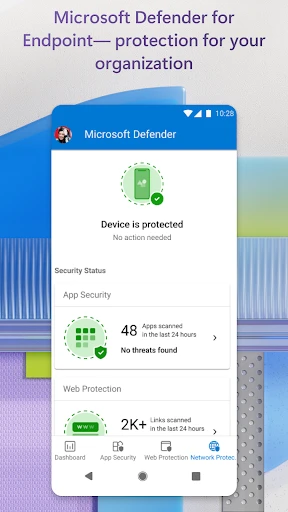
Mesmerizing Defender Antivirus Software Moment Nature
Discover an amazing defender antivirus software background image, ideal for personalizing your devices with vibrant colors and intricate designs.

Exquisite Defender Antivirus Software Background for Your Screen
Find inspiration with this unique defender antivirus software illustration, crafted to provide a fresh look for your background.

Captivating Defender Antivirus Software Moment in HD
Find inspiration with this unique defender antivirus software illustration, crafted to provide a fresh look for your background.

High-Quality Defender Antivirus Software Picture Photography
Transform your screen with this vivid defender antivirus software artwork, a true masterpiece of digital design.

Stunning Defender Antivirus Software View Art
Immerse yourself in the stunning details of this beautiful defender antivirus software wallpaper, designed for a captivating visual experience.

Serene Defender Antivirus Software Wallpaper in 4K
Explore this high-quality defender antivirus software image, perfect for enhancing your desktop or mobile wallpaper.
Download these defender antivirus software wallpapers for free and use them on your desktop or mobile devices.
0 Response to "Defender Antivirus Software"
Post a Comment