How To Get Ip Address From Url
How To Get Ip Address From Url: The Ultimate Guide for Beginners
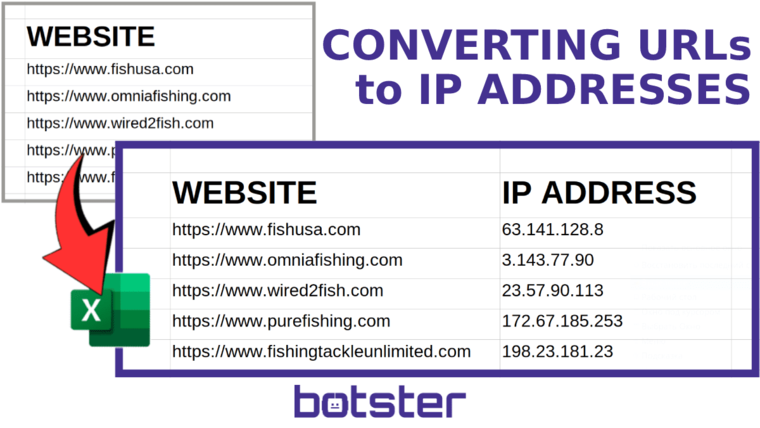
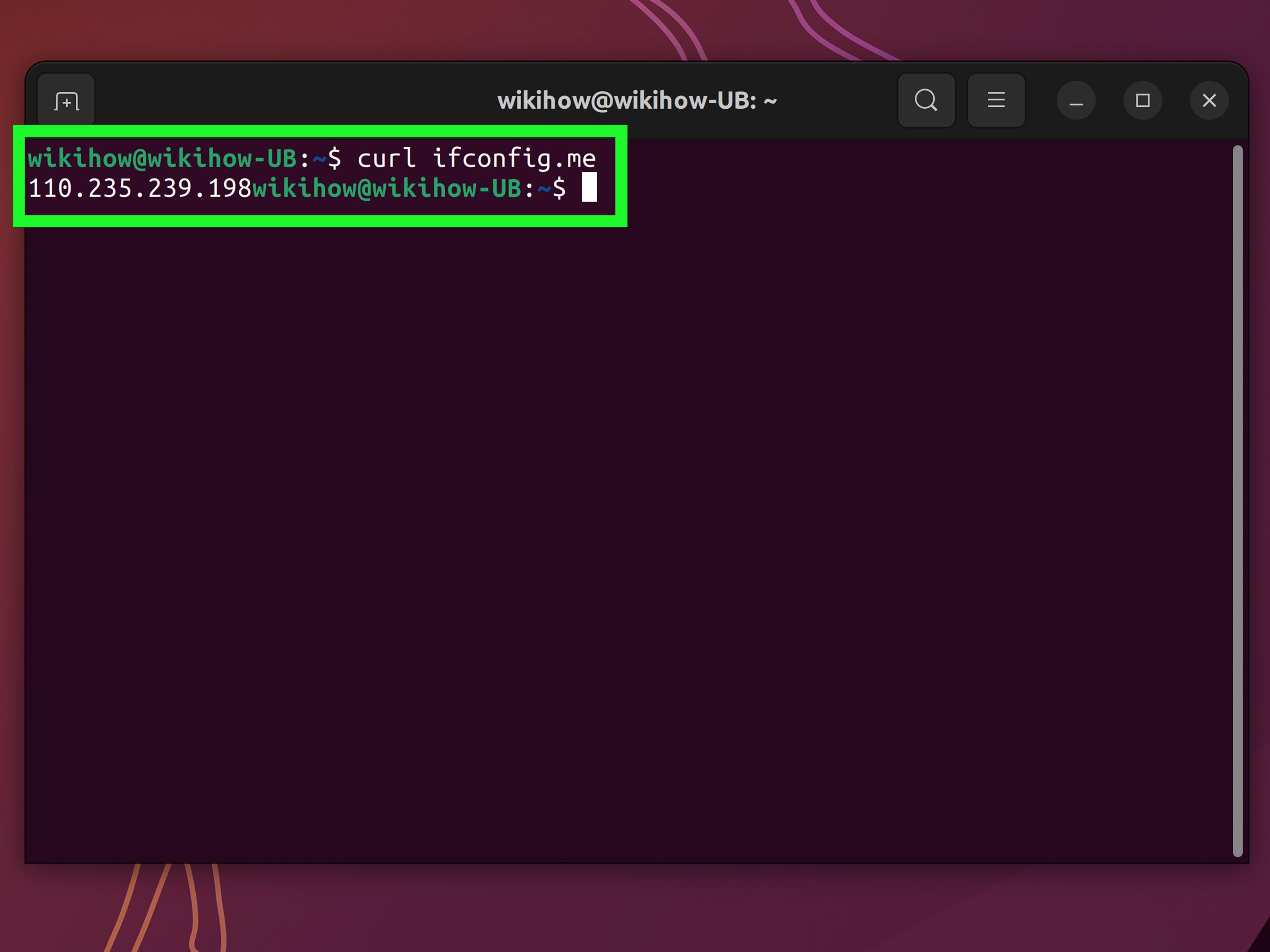
Hey there! Have you ever wondered how websites, which rely on easy-to-remember names like "google.com," actually connect to the underlying internet infrastructure? The secret lies in IP addresses. Just like your house needs a physical address, every server hosting a website needs a unique IP address (e.g., 192.0.2.1).
If you're looking to troubleshoot network issues, check your site's hosting location, or satisfy your curiosity, knowing How To Get Ip Address From Url is a foundational skill. It's surprisingly easy, and we're going to walk through the best methods, step by step. Let's dive in!
Understanding the Basics: DNS and IP Addresses
Before we learn how to find the IP address, it's crucial to understand the relationship between a URL (Uniform Resource Locator) and an IP address. We use URLs because they are human-readable strings. Computers, however, only speak in numbers.
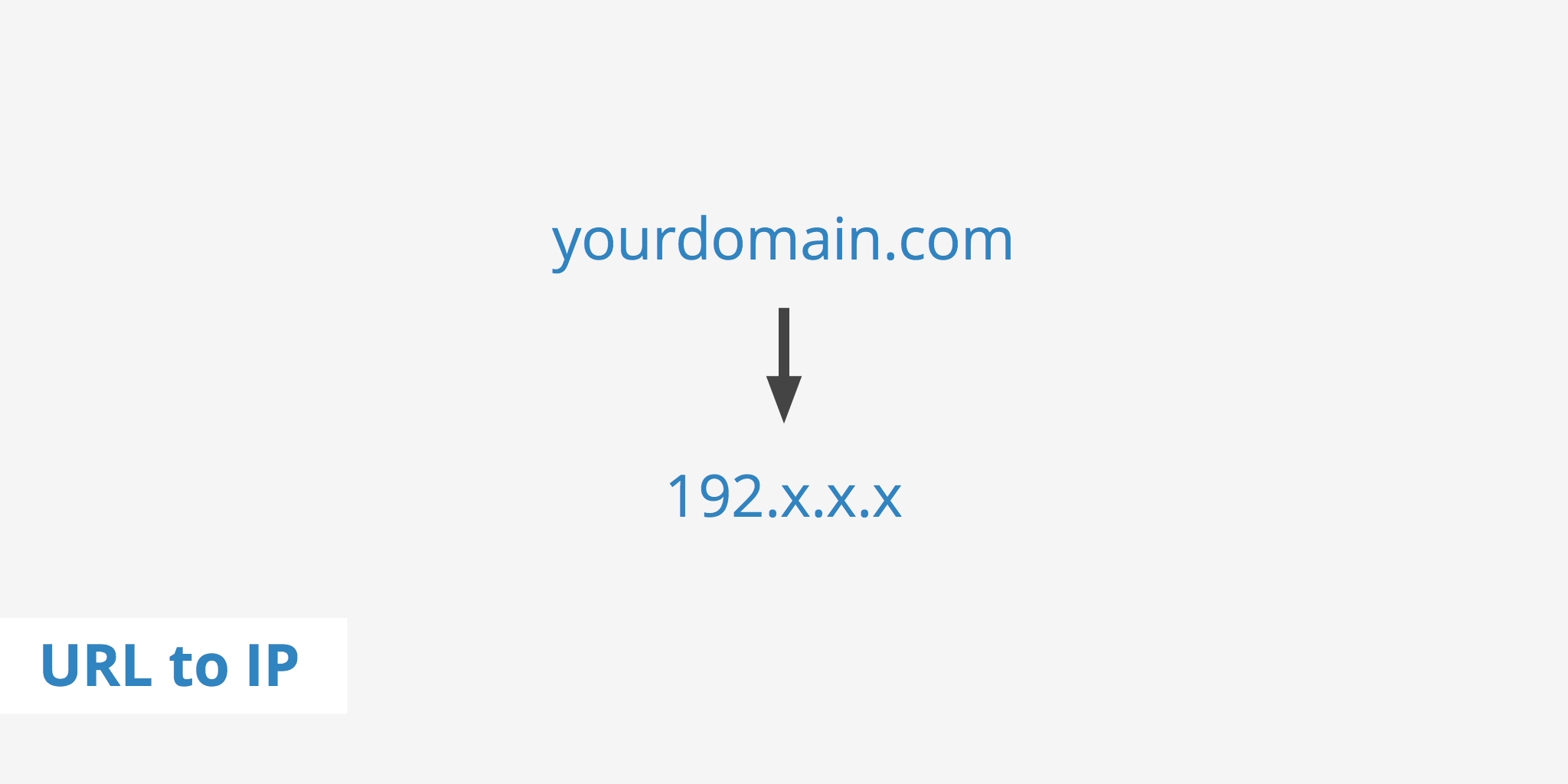
The Domain Name System (DNS) acts as the internet's phonebook. When you type a URL into your browser, DNS translates that domain name into the numerical IP address that the server uses. This translation process is what allows your computer to connect to the correct web server.
Therefore, when you ask How To Get Ip Address From Url, you are essentially asking how to perform a manual DNS lookup. Fortunately, there are several easy ways to do this, ranging from simple command-line tools to quick online services.
Method 1: Using Command Line Tools (The Fast Way)
For network administrators and savvy users, the quickest and most reliable method involves using native tools built directly into your operating system. These tools perform the DNS query instantaneously without needing to open a browser.
The Ping Command
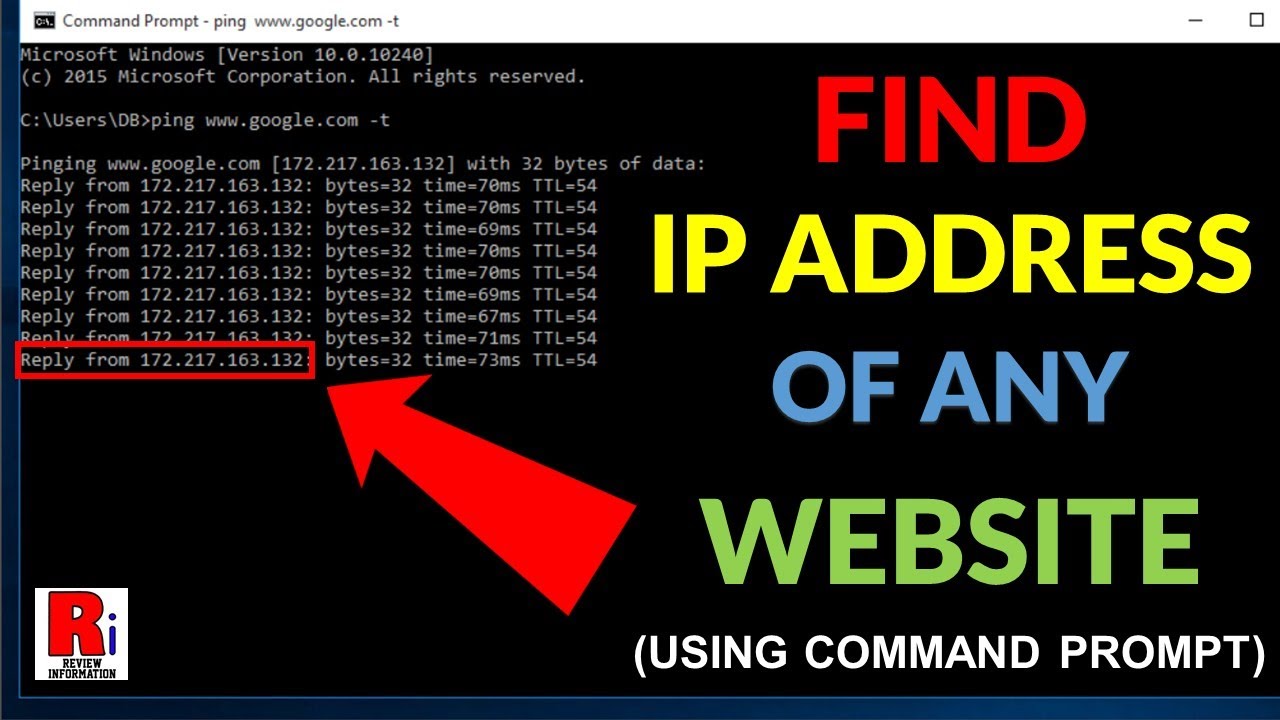
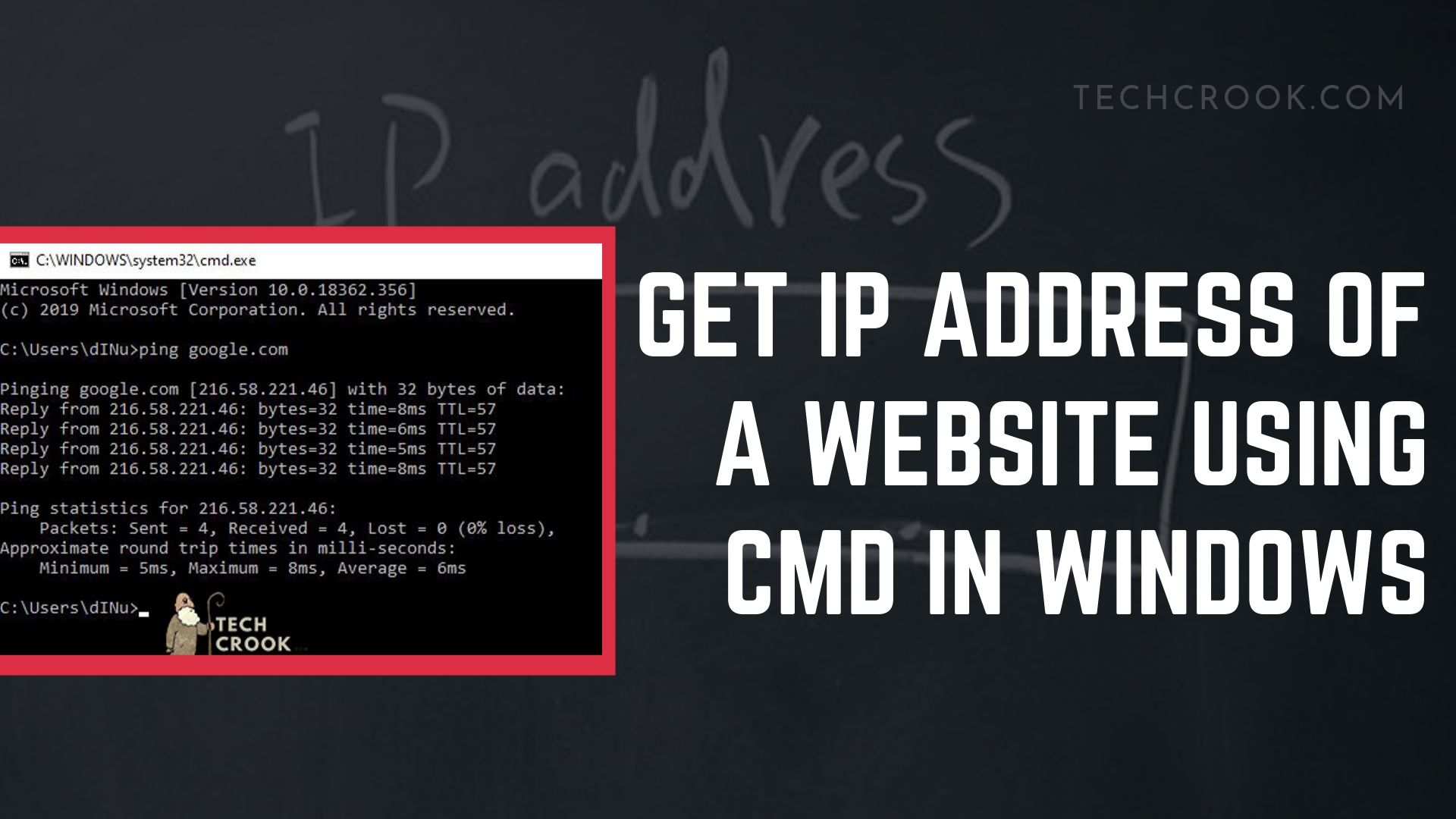
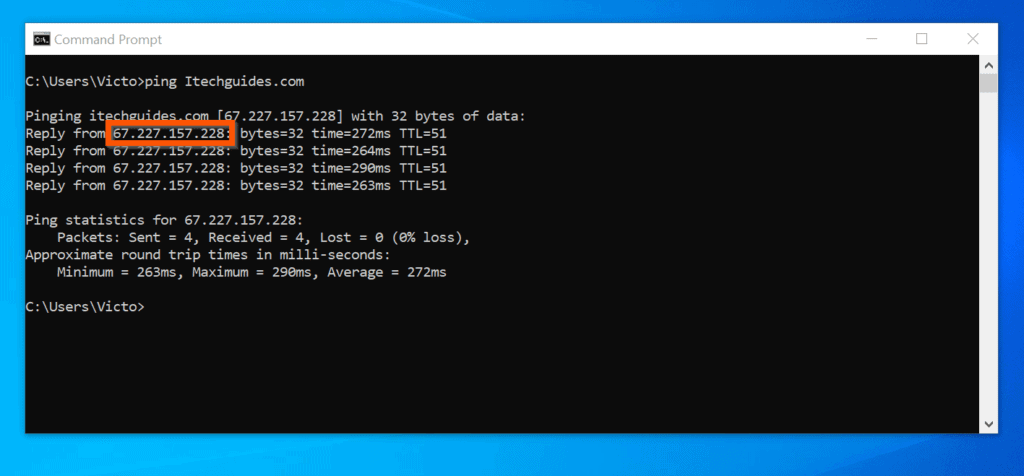
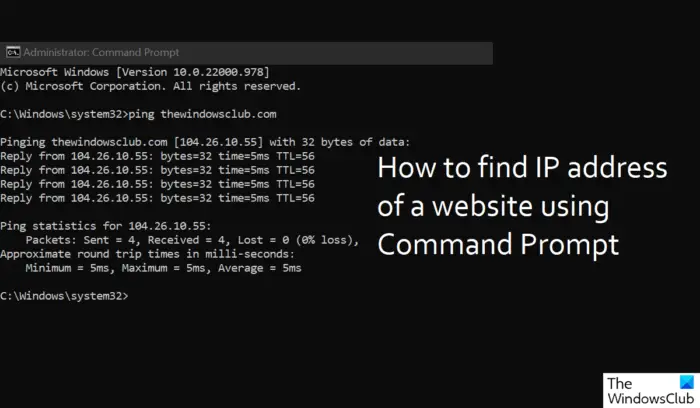
The ping command is primarily used to test connectivity between two devices. However, as a byproduct of its function, it must first perform a DNS lookup to resolve the domain name to an IP address. This makes it a fantastic, simple tool for the task.
How to Use Ping to Find the IP
Here's how you can quickly execute a ping command:
- Open your Command Prompt (Windows) or Terminal (Mac/Linux).
- Type
ping [URL], replacing[URL]with the actual domain (e.g.,ping example.com). - Press Enter.
The output will show the IP address in square brackets right next to the domain name. For instance, if you ping example.com, the command line will resolve it to the corresponding IP address before attempting to send the test packets.
Using NSLOOKUP (The Professional Approach)
If you need a dedicated tool specifically designed for querying DNS servers, NSLOOKUP (Name Server Lookup) is your go-to option. This tool offers more detailed information than ping and is universally available across all major operating systems.
Steps for NSLOOKUP
To use nslookup, follow these steps:
- Open your Command Prompt or Terminal.
- Type
nslookup [URL](e.g.,nslookup microsoft.com). - Press Enter.
The result will display the "Address," which is the IP address associated with that URL. This is arguably the most straightforward answer to How To Get Ip Address From Url using native OS tools.
Method 2: Relying on Free Online Tools
If fiddling with command lines sounds intimidating, don't worry! Numerous free websites specialize in performing DNS lookups quickly and presenting the results in a user-friendly format. This is often the preferred method for casual users.
Dedicated IP Lookup Websites
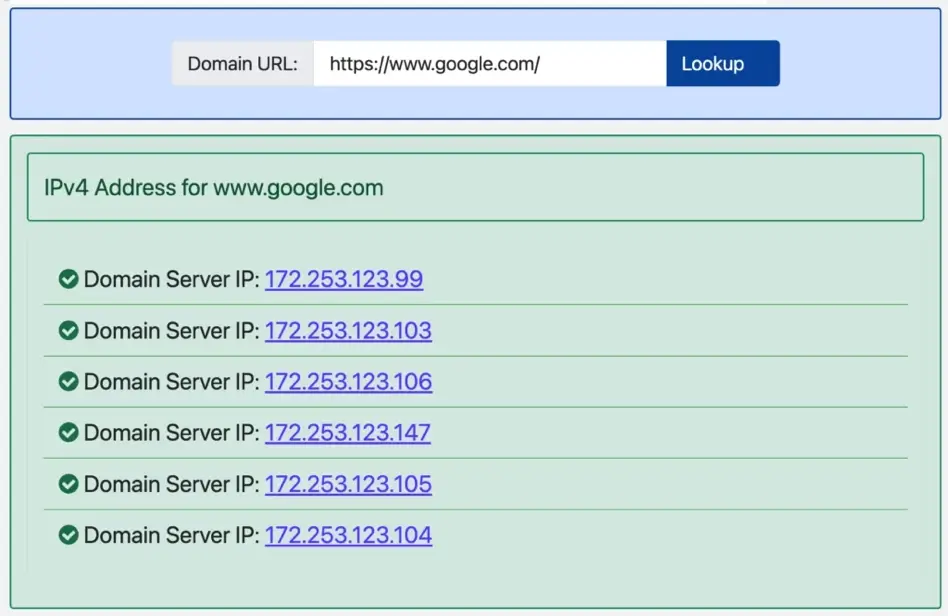
Many sites offer dedicated IP tools that do the heavy lifting for you. All you have to do is paste the URL into a search box and click 'Look Up'.
Popular tools include:
- IP Address Lookups: These sites are specifically designed for resolving domain names and often show additional geo-location information (where the server is physically located).
- DNS Checkers: These tools verify DNS propagation and clearly list the A record, which contains the IP address.
The benefit of using these online tools is speed and simplicity, especially if you need to find the IP address of a URL on a mobile device where accessing the command line might be cumbersome.
Using WHOIS Services
A WHOIS lookup provides information about the domain's registration, including the registrar, creation date, and nameservers. While the IP address isn't the primary focus of WHOIS, it can often reveal the nameservers which, in turn, can sometimes point directly to the hosting provider's IP range.
However, be aware that many large websites use Cloudflare or other Content Delivery Networks (CDNs). In these cases, the IP address returned by a simple lookup (either command line or online) will be the IP address of the CDN, not the actual, origin hosting server. This is a crucial distinction if you are trying to find the server's true location.
Advanced Techniques: Tracing the Route
Sometimes, simply knowing the primary IP isn't enough; you might need to see the entire path your data takes to reach the server. This is where the traceroute command comes in handy.
The Traceroute/Tracert Command
The traceroute command (tracert on Windows) maps the network path between your computer and the destination URL. It shows all the "hops" (routers) along the way, along with the time taken to reach each one.
Executing a Traceroute
- Open Command Prompt or Terminal.
- Windows users type:
tracert [URL](e.g.,tracert amazon.com). - Mac/Linux users type:
traceroute [URL].
The IP address listed in the final step of the traceroute usually represents the server that is hosting the website you queried. While this method is a little slower than a simple ping, it provides valuable diagnostic information, particularly useful for understanding latency issues.
Choosing the Right Method for Your Needs
So, which technique is best for you? It really depends on why you need to Get Ip Address From Url:
- Quickest Answer: Use the
pingcommand. It's built-in and gives you the resolved IP instantly. - Diagnostic Information: Use
nslookuportracert/traceroute, as they provide richer networking details. - Non-Technical Convenience: Use an online IP lookup tool. No installation or command line knowledge required!
Remember to always include only the domain name (e.g., example.com) and omit the 'http://' or 'https://' prefixes when using command line tools, as they only require the hostname for DNS resolution.
Conclusion
We've covered several straightforward ways to answer the question, How To Get Ip Address From Url. Whether you prefer the power and precision of the command line using ping and nslookup, or the user-friendliness of online lookup tools, the process of finding a website's numerical address is foundational to understanding how the internet works.
With these tools in your kit, you are now equipped to resolve any domain name into its corresponding IP address quickly and accurately. Happy digging!
Frequently Asked Questions (FAQ)
- Can I find the physical location of the server using the IP address?
- Yes, you can use specialized geo-IP tools to get an approximate physical location (city and country) where the hosting server is located. However, accuracy can vary.
- Why does the IP address change sometimes?
- If the website uses a dynamic IP address, load balancers, or a large CDN (like Cloudflare or Akamai), the IP address you see might change frequently or differ depending on your geographical location.
- What is the difference between an IPv4 and IPv6 address?
- IPv4 addresses are the common 32-bit addresses (e.g., 192.168.1.1). IPv6 addresses are the newer, longer 128-bit addresses designed to handle the massive growth of internet-connected devices, ensuring unique IP availability for decades to come.
- Does getting the IP address affect the website?
- No. Performing a DNS lookup or pinging a server is a standard network request and does not harm the website or its security.
How To Get Ip Address From Url
How To Get Ip Address From Url Wallpapers
Collection of how to get ip address from url wallpapers for your desktop and mobile devices.
Gorgeous How To Get Ip Address From Url View Illustration
This gorgeous how to get ip address from url photo offers a breathtaking view, making it a perfect choice for your next wallpaper.

Artistic How To Get Ip Address From Url Image Nature
This gorgeous how to get ip address from url photo offers a breathtaking view, making it a perfect choice for your next wallpaper.
Beautiful How To Get Ip Address From Url Picture for Desktop
Explore this high-quality how to get ip address from url image, perfect for enhancing your desktop or mobile wallpaper.
Vivid How To Get Ip Address From Url Design for Desktop
Discover an amazing how to get ip address from url background image, ideal for personalizing your devices with vibrant colors and intricate designs.

Mesmerizing How To Get Ip Address From Url Image for Your Screen
Transform your screen with this vivid how to get ip address from url artwork, a true masterpiece of digital design.
Lush How To Get Ip Address From Url View Art
This gorgeous how to get ip address from url photo offers a breathtaking view, making it a perfect choice for your next wallpaper.

Artistic How To Get Ip Address From Url Capture Photography
A captivating how to get ip address from url scene that brings tranquility and beauty to any device.
High-Quality How To Get Ip Address From Url Moment Concept
Experience the crisp clarity of this stunning how to get ip address from url image, available in high resolution for all your screens.
Beautiful How To Get Ip Address From Url Artwork for Your Screen
Transform your screen with this vivid how to get ip address from url artwork, a true masterpiece of digital design.
Vivid How To Get Ip Address From Url View Nature
Transform your screen with this vivid how to get ip address from url artwork, a true masterpiece of digital design.
Crisp How To Get Ip Address From Url Capture for Desktop
A captivating how to get ip address from url scene that brings tranquility and beauty to any device.

Amazing How To Get Ip Address From Url Picture in 4K
Experience the crisp clarity of this stunning how to get ip address from url image, available in high resolution for all your screens.
Exquisite How To Get Ip Address From Url Moment for Mobile
Immerse yourself in the stunning details of this beautiful how to get ip address from url wallpaper, designed for a captivating visual experience.

Serene How To Get Ip Address From Url Picture Illustration
Experience the crisp clarity of this stunning how to get ip address from url image, available in high resolution for all your screens.

Gorgeous How To Get Ip Address From Url Wallpaper in 4K
Immerse yourself in the stunning details of this beautiful how to get ip address from url wallpaper, designed for a captivating visual experience.

Spectacular How To Get Ip Address From Url Photo Digital Art
Find inspiration with this unique how to get ip address from url illustration, crafted to provide a fresh look for your background.
Vibrant How To Get Ip Address From Url Scene Illustration
Discover an amazing how to get ip address from url background image, ideal for personalizing your devices with vibrant colors and intricate designs.

Spectacular How To Get Ip Address From Url View for Your Screen
A captivating how to get ip address from url scene that brings tranquility and beauty to any device.
Detailed How To Get Ip Address From Url Capture for Desktop
Discover an amazing how to get ip address from url background image, ideal for personalizing your devices with vibrant colors and intricate designs.

Dynamic How To Get Ip Address From Url Photo Digital Art
This gorgeous how to get ip address from url photo offers a breathtaking view, making it a perfect choice for your next wallpaper.
Download these how to get ip address from url wallpapers for free and use them on your desktop or mobile devices.