How To Get Virus Off Your Phone
How To Get Virus Off Your Phone: The Complete Guide to Mobile Malware Removal
It's a truly awful feeling when you realize your trusty smartphone might be compromised. Suddenly, everything feels slow, ads pop up relentlessly, and you worry about your personal data. If you're asking, "How To Get Virus Off Your Phone?" you are in the right place.
Don't panic! While mobile viruses (or more accurately, malware) are annoying, removing them is usually straightforward, provided you act quickly. This comprehensive guide will walk you through the diagnosis, the immediate fixes, and the step-by-step removal process for both Android and iOS devices.
Signs Your Phone Might Be Infected
Before you jump into the deep end of malware removal, you need to confirm that your phone is actually infected and not just having a bad day due to low storage or aging hardware. Understanding the symptoms is the first critical step.
Identifying Common Malware Symptoms
Malware often tries to hide, but it usually leaves some telltale signs behind. These symptoms often reflect the malicious processes running constantly in the background.
Look out for the following unusual behaviors:
- Excessive Data Usage: Malware might be secretly sending information back to a remote server, dramatically increasing your mobile data consumption.
- Rapid Battery Drain: If your battery suddenly dies much faster than usual, an unauthorized application could be hogging resources.
- Aggressive Pop-Up Ads: If you see ads appearing even when your browser is closed, this is a strong indicator of adware infection.
- Unexplained Charges: Some malicious apps subscribe you to premium services without your permission.
- Performance Issues: Your phone becomes sluggish, freezes frequently, or apps crash for no reason.
If you notice several of these signs, it's time to learn How To Get Virus Off Your Phone immediately.
Immediate Steps: Cutting the Connection
The first thing you need to do is isolate the threat. Think of this as putting the malware in time-out so it can't cause any more damage or transmit your data.
Why Turning Off Wi-Fi and Data is Crucial
Cutting the internet connection stops the malware from communicating with its command and control server. This prevents data exfiltration and stops the malware from downloading further harmful components.
Simply turn off your Wi-Fi and mobile data. Better yet, switch your phone into Airplane Mode immediately. Once disconnected, you can proceed with the removal process without the threat updating itself.
Step-by-Step Guide for Android Users
Android devices are the most common targets for mobile malware, primarily because of the open-source nature of the operating system and the ability to sideload apps. The safest and most effective method involves using Safe Mode.
Entering Safe Mode on Android
Safe Mode temporarily disables all third-party applications, including the malicious one. This gives you the control you need to remove the unwanted program.
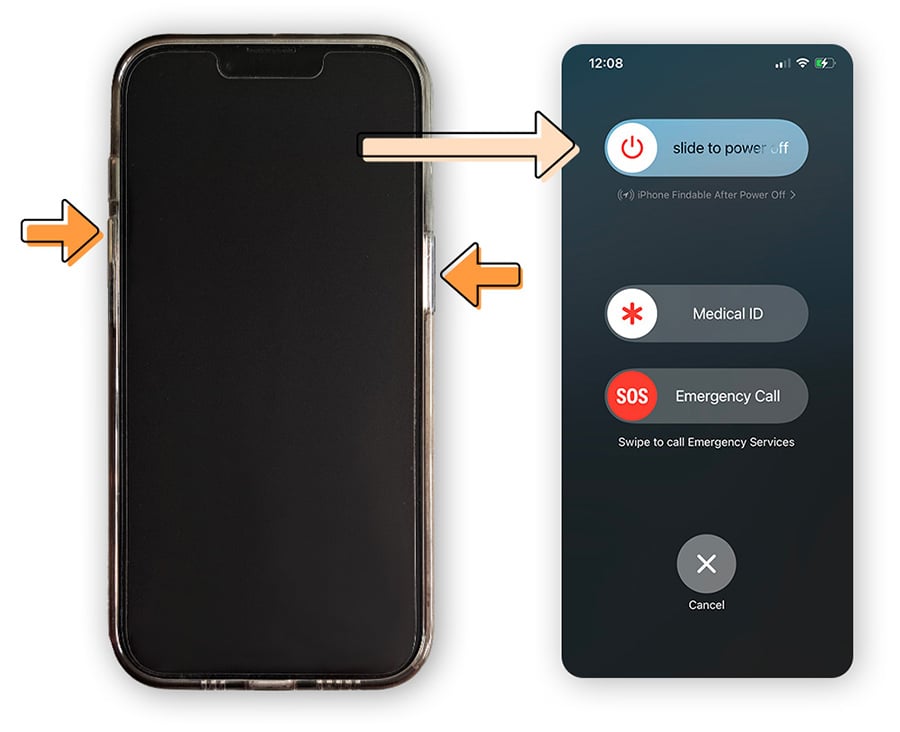
- Press and hold the Power button until the Power menu appears.
- Press and hold the Power Off option on your screen (or sometimes the Restart button, depending on your model).
- A prompt should appear asking if you want to reboot into Safe Mode. Tap OK or Yes.
- When the phone restarts, you will see "Safe Mode" displayed, usually in the corner of the screen.
Finding and Deleting the Malicious App
Once you are in Safe Mode, navigate to your application list. Look closely for any suspicious applications you don't remember installing, or applications with strange names or generic icons.
- Go to Settings > Apps & Notifications > See all apps.
- Identify the suspicious app. If you installed it around the time the problems started, that's your likely culprit.
- Tap the app, then select Uninstall. If the Uninstall button is grayed out, the app might have administrator privileges.
Removing Device Administrator Privileges
Some powerful malware grants itself administrative rights to prevent easy removal. You must revoke these privileges first.
- Go to Settings > Security > Device Admin Apps (or Device Administrators, location varies by phone).
- Uncheck or deactivate the suspicious application.
- Now, return to the App list and you should be able to Uninstall the app completely.
Finally, restart your phone normally to exit Safe Mode. Check if the symptoms have disappeared. If they have, congratulations—you know How To Get Virus Off Your Phone!
Dealing with Potential iOS Issues
While iPhones and iPads are generally more secure due to Apple's restrictive app ecosystem, they are not immune to issues. Most "iOS viruses" are actually browser-based pop-ups, calendar spam, or issues resulting from a "jailbroken" device.
If your device is standard (not jailbroken), focus on removing problematic data and configurations.
Clearing Browser Data and Restoring Backups
For persistent pop-ups, clear your browser history and data. Also, check for suspicious profiles and calendar entries.
- Clear Safari Data: Go to Settings > Safari > Clear History and Website Data.
- Check Calendar Spam: Go to Settings > Calendar > Accounts. Look for any accounts you didn't knowingly subscribe to and delete them.
- Check Profiles: If you were tricked into installing a configuration profile, go to Settings > General > VPN & Device Management (or Profiles). Delete any unauthorized profiles.
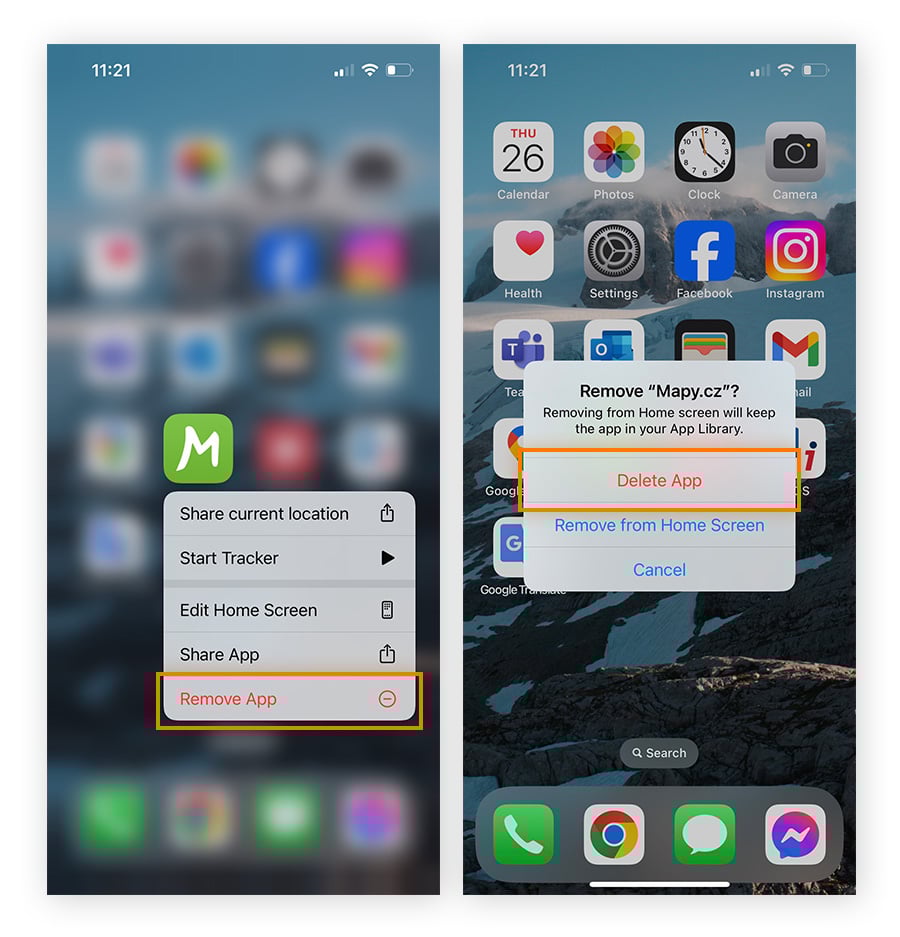
If the problem started after downloading a specific app, simply long-press the app icon and select "Delete App." If necessary, restore your iPhone from a backup created before the infection started.
The Nuclear Option: Factory Reset
If none of the above steps worked, or if you suspect deep-rooted malware that survived Safe Mode removal, a factory reset is your last resort. This will wipe everything off your device and return it to its original, clean state.
When to Use the Factory Reset
Only use the factory reset if the malware is crippling your device or if you handle highly sensitive information. Remember to back up important photos and documents first, but DO NOT restore infected applications from that backup.
For Android: Go to Settings > System > Reset options > Erase all data (factory reset).
For iOS: Go to Settings > General > Transfer or Reset iPhone > Erase All Content and Settings.
After the reset, when setting up your phone, choose to set it up as a "new device" rather than restoring from a potentially infected cloud backup.
Prevention is Better Than Cure
Once your phone is clean, take steps to ensure this never happens again. Mobile security relies heavily on user vigilance.
Follow these best practices:
- Only download apps from official sources (Google Play Store or Apple App Store).
- Check app reviews and permissions before installing anything new. If a calculator app asks for microphone access, something is wrong.
- Keep your operating system and all applications fully updated, as updates often patch security vulnerabilities.
- Never click on suspicious links sent via email or text message, even if they appear to come from a known entity.
- Consider installing a reputable mobile antivirus application, especially on Android.
Conclusion
Dealing with a compromised phone is stressful, but understanding the signs and following the correct procedures empowers you to take control. Whether you utilize Safe Mode on Android or clean up profiles on iOS, knowing How To Get Virus Off Your Phone is a crucial modern skill.
Remember to always prioritize cutting the internet connection first, then systematically removing the unauthorized applications or configuration files. If all else fails, the factory reset will guarantee a clean start, ensuring your mobile security is restored.
Frequently Asked Questions (FAQ)
- Can iPhones actually get viruses?
- True traditional viruses are extremely rare on standard (non-jailbroken) iPhones because Apple tightly controls the App Store and sandboxes applications. However, iPhones can still be affected by malware, aggressive adware, calendar spam, or targeted phishing attacks.
- Is it safe to use my phone while I think it has a virus?
- No. As soon as you suspect an infection, you should minimize usage and, most importantly, disconnect from the internet immediately. Avoid logging into banking apps or entering passwords until the device is confirmed clean.
- Will an antivirus app guarantee How To Get Virus Off Your Phone?
- A good mobile antivirus app (especially on Android) is highly effective at detecting and removing known threats. However, it's not foolproof. Some aggressive malware may require manual removal via Safe Mode or a factory reset, which is why manual steps are essential.
- What should I do after uninstalling the malware?
- After uninstalling the suspicious app and restarting your phone, you should change all your critical passwords (especially for email, banking, and social media) using a separate, secure device (like a trusted PC), just in case the malware managed to capture login credentials.
How To Get Virus Off Your Phone
How To Get Virus Off Your Phone Wallpapers
Collection of how to get virus off your phone wallpapers for your desktop and mobile devices.
/filters:quality(60)/2020-03-12-How-to-Get-a-Virus-off-Your-Phone-CDN.png "Gorgeous How To Get Virus Off Your Phone Picture Digital Art")
Gorgeous How To Get Virus Off Your Phone Picture Digital Art
Immerse yourself in the stunning details of this beautiful how to get virus off your phone wallpaper, designed for a captivating visual experience.
Dynamic How To Get Virus Off Your Phone Photo in 4K
This gorgeous how to get virus off your phone photo offers a breathtaking view, making it a perfect choice for your next wallpaper.

Breathtaking How To Get Virus Off Your Phone Moment in 4K
Discover an amazing how to get virus off your phone background image, ideal for personalizing your devices with vibrant colors and intricate designs.
Mesmerizing How To Get Virus Off Your Phone Picture Illustration
Experience the crisp clarity of this stunning how to get virus off your phone image, available in high resolution for all your screens.
High-Quality How To Get Virus Off Your Phone Picture for Mobile
Explore this high-quality how to get virus off your phone image, perfect for enhancing your desktop or mobile wallpaper.
Mesmerizing How To Get Virus Off Your Phone Capture Photography
Experience the crisp clarity of this stunning how to get virus off your phone image, available in high resolution for all your screens.

Detailed How To Get Virus Off Your Phone Design Digital Art
Explore this high-quality how to get virus off your phone image, perfect for enhancing your desktop or mobile wallpaper.
Vivid How To Get Virus Off Your Phone Scene for Your Screen
Experience the crisp clarity of this stunning how to get virus off your phone image, available in high resolution for all your screens.
Stunning How To Get Virus Off Your Phone Scene for Your Screen
Find inspiration with this unique how to get virus off your phone illustration, crafted to provide a fresh look for your background.
Vivid How To Get Virus Off Your Phone Image for Mobile
Experience the crisp clarity of this stunning how to get virus off your phone image, available in high resolution for all your screens.
Vivid How To Get Virus Off Your Phone Picture for Mobile
Experience the crisp clarity of this stunning how to get virus off your phone image, available in high resolution for all your screens.

Serene How To Get Virus Off Your Phone Image in 4K
Transform your screen with this vivid how to get virus off your phone artwork, a true masterpiece of digital design.

Lush How To Get Virus Off Your Phone Moment Digital Art
Find inspiration with this unique how to get virus off your phone illustration, crafted to provide a fresh look for your background.

Amazing How To Get Virus Off Your Phone Capture Concept
Discover an amazing how to get virus off your phone background image, ideal for personalizing your devices with vibrant colors and intricate designs.

Crisp How To Get Virus Off Your Phone Scene Illustration
Immerse yourself in the stunning details of this beautiful how to get virus off your phone wallpaper, designed for a captivating visual experience.

Lush How To Get Virus Off Your Phone Capture Digital Art
A captivating how to get virus off your phone scene that brings tranquility and beauty to any device.

Spectacular How To Get Virus Off Your Phone Abstract Illustration
A captivating how to get virus off your phone scene that brings tranquility and beauty to any device.
Mesmerizing How To Get Virus Off Your Phone Scene for Desktop
Discover an amazing how to get virus off your phone background image, ideal for personalizing your devices with vibrant colors and intricate designs.

Gorgeous How To Get Virus Off Your Phone Photo in 4K
A captivating how to get virus off your phone scene that brings tranquility and beauty to any device.

Amazing How To Get Virus Off Your Phone Photo Digital Art
Explore this high-quality how to get virus off your phone image, perfect for enhancing your desktop or mobile wallpaper.
Download these how to get virus off your phone wallpapers for free and use them on your desktop or mobile devices.